Detection Mode: ConfiguredTypesAnyCount
 | More configured movers than existing movers possible The DetectionMode ConfiguredTypesAnyCount allows you to create more movers in the configuration of your system than are available on the system. Movers that are not available can be added at a later date. |
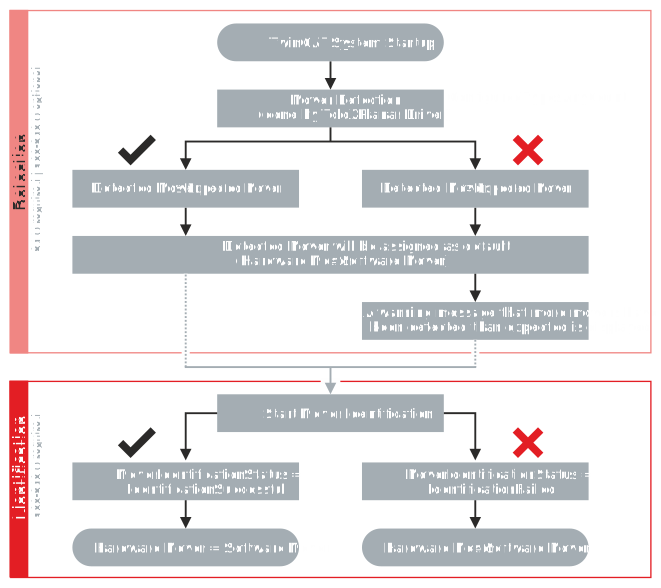
After TwinCAT system startup, a Mover Detection is performed and a check is made to see whether the number of detected movers matches the number of expected movers. During detection, only the absolute positions of the movers are detected. The movers are assigned to the software axes using ascending Y-positions. The Mover Detection runs through once.
If the number of detected movers is greater than the number of expected movers, a warning message is issued. Too many movers must be removed before Mover Identification.
| |
Correct the number of movers after receiving a warning message If more movers have been detected on the system than expected, you must adjust the number of movers on the system according to your configuration or the configuration according to the number of movers on the system. If the number of detected and expected movers does not match, this can result in damage to the movers and injuries from splinters in the eyes.
|

After successful detection, removal of excess movers and when the load voltage is applied to the XPlanar system, Mover Identification can be started. As soon as Mover Identification has been started, the system automatically communicates with the movers with ID bumpers to establish a unique assignment between the XPlanar Movers and the software axes.
The current status of the communication process is displayed via the CoordinatedMoverCommStatus. After successful identification, the hardware movers are assigned to the software movers.