Required Settings
Before Mover Detection can be started, some settings must be made in TwinCAT.
 | Example presentation The following example shows the settings for an APM4330-0000 mover and an AMP9001-0000-4330 ID bumper. The figures show the corresponding settings for this example configuration. |

- ►Expand Solution Explorer > System > TcCOM Objects > Object (XPlanarProcessingUnit)
- ►Click on Object (XPlanarMover)
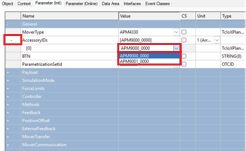
- ►Click the Parameter (Init) tab in the project window
- ►Expand General
- ►Expand AccessoryIDs
- ►Select ID bumper APM9001-0000 in the [0] drop-down menu
 | BTN of the mover Each mover requires its own BTN | Beckhoff Traceability Number. The mover's BTN can be found on every mover under the BIC | Beckhoff Identification Code. Multiple assignment of a mover BTN leads to errors in Mover Identification. Further information on the BTN can be found in the XPlanar original operating instructions or at: |

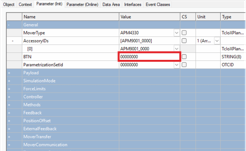
- ►Enter the BTN of a hardware mover in the BTN input field
- ►Configure ID bumpers and BTN for all objects (XPlanarMover) in the same way
To apply the settings, the configuration must be reactivated and the TwinCAT system must be restarted.