Object XPlanarProcessingUnit
To start Mover Identification via the object (XPlanarProcessingUnit) in TwinCAT, the XPlanar system must be in Run Mode and the load voltage must be applied to the system.
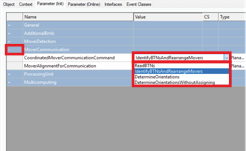
- ►Expand MoverCommunication
- ►Select ReadBTNs in the CoordinatedMoverCommunicationCommand drop-down menu if the BTNs of the mover objects are to be saved for reading into the PLC under XPlanarMover/Parameter(Online)/MoverCommunicationData/IdentifiedMoverBTN
- ►Select IdentifyBTNsAndRearrangeMovers in the CoordinatedMoverCommunicationCommand drop-down menu if mover objects are to be assigned to the BTNs found
- ►Select DetectOrientationsWithoutAssigning in the CoordinatedMoverCommunicationCommand drop-down menu if the mover's orientation is to be detected and not applied
OR
- ►Select DetectOrientations in the CoordinatedMoverCommunicationCommand drop-down menu if the mover's orientation is to be detected and assigned
| |
Correct the number of movers after receiving a warning message If more movers have been detected on the system than expected, you must adjust the number of movers on the system according to your configuration or the configuration according to the number of movers on the system. If the number of detected and expected movers does not match, this can result in damage to the movers and injuries from splinters in the eyes.
|

Only start Mover Identification when the number of detected movers is less than or equal to the number of expected movers.
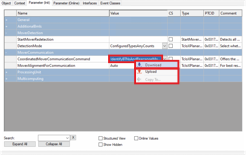
- ►Right-click in the CoordinatedMoverCommunicationCommand input field to open the context menu
- ►In the context menu click Download
Further Information