MC_GearIn
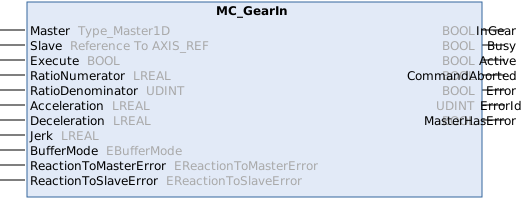
Synchronizes the slave onto the master's velocity and acceleration scaled by a constant gear ratio. Synchronizes as fast as the function block's inputs Acceleration, Deceleration and Jerk allow. MC_GearIn has no input Velocity. The axis' parameter Maximum Velocity is used while synchronizing. Once the slave has reached the scaled velocity and acceleration, the function block's output InGear signals true and the slave is coupled to the scaled master. From then on the slave's dynamics and position are coupled to the scaled master's, ignoring any dynamic restrictions (commanded dynamics as well as axis parameters). The position relationship when reaching InGear is consequently not configurable. Use MC_GearInPos when a specific position relationship is required. The command may be ended by sending another command. Using input BufferMode := Aborting makes the next command take over immediately while input BufferMode := Buffered queues the next command. It will then take over as soon as InGear is reached.
Syntax
Definition:
FUNCTION_BLOCK MC_GearIn
VAR_INPUT
Master : Type_Master1D;
Slave : Reference To AXIS_REF;
Execute : BOOL;
RatioNumerator : LREAL;
RatioDenominator : UDINT;
Acceleration : LREAL;
Deceleration : LREAL;
Jerk : LREAL;
BufferMode : EBufferMode;
ReactionToMasterError : EReactionToMasterError;
ReactionToSlaveError : EReactionToSlaveError;
END_VAR
VAR_OUTPUT
InGear : BOOL;
Busy : BOOL;
Active : BOOL;
CommandAborted : BOOL;
Error : BOOL;
ErrorId : UDINT;
MasterHasError : BOOL;
END_VAR Inputs
Name | Type | Default | Description |
|---|---|---|---|
Master |
| Reference to the master axis | |
Slave | Reference To AXIS_REF |
| Reference to the slave axis |
Execute | BOOL |
| Trigger the command with rising edge. |
RatioNumerator | LREAL | 1.0 | The numerator of the gear ratio. Once synchronous, the slave's velocity, acceleration and position changes are (RatioNumerator / RatioDenominator) times the master's values. A negative value moves the slave opposite to the master. |
RatioDenominator | UDINT | 1 | The denominator of the gear ratio |
Acceleration | LREAL | #Default | The input Acceleration is used for planning the synchronization ([PosUnit]/s^2, positive). It is not a strict maximum, it might be exceeded due to initial conditions. It has no effect once the slave is synchronous. Must currently be equal to input Deceleration. |
Deceleration | LREAL | #Default | The input Deceleration used for planning the synchronization ([PosUnit]/s^2, positive). Not a strict maximum, see input Acceleration. It has no effect once the slave is synchronous. Must currently be equal to input Acceleration. |
Jerk | LREAL | #Default | The jerk used to ramp up or down acceleration during planning the synchronization ([PosUnit]/s^3, positive). It has no effect once the slave is synchronous. |
BufferMode | Aborting | Whether the command shall take effect immediately (Aborting) or be queued (Buffered). | |
ReactionToMasterError | TriggerSlaveError | This input affects how the slave axis reacts to an error on the master axis. | |
ReactionToSlaveError | TriggerMasterError | This input affects how an error on the slave axis is propagated to the master axis. |
 Outputs
|
Name |
Type |
Description |
|---|---|---|
|
InGear |
BOOL |
TRUE once the slave has reached the master's velocity and acceleration scaled by the gear ratio. From then on the slave's velocity, acceleration and position changes are locked to the scaled master's values. The lock is permanent for the remainder of the command. |
|
Busy |
BOOL |
The function block is not finished and new output values are to be expected. |
|
Active |
BOOL |
The function block has active control on the axis. |
|
CommandAborted |
BOOL |
The command is aborted by another command. |
|
Error |
BOOL |
An error occurred within the function block. |
|
ErrorId |
UDINT |
Error identifier |
|
MasterHasError |
BOOL |
Master is in error state. |
Further information
The Acceleration and Deceleration inputs must be set to the same value. Furthermore, coupling is only possible when the slave axis is at a standstill.
Additional information on ReactionToSlaveError and ReactionToMasterError
As a general rule, if there is an error on the slave axis:
- Slave axis: The coupling is released, and the response depends on the error type.
- Master Axis: The master axis reports an error and either follows the MC's stop ramp or continues its current motion without being affected.
If there is an error on the master axis:
- Master axis: The response depends on the type of error.
- Slave axis: The slave axis reports an error and follows either the MC's stop ramp or the master axis's setpoints.
Detailed information is provided in the Error behavior chapter.
Possible error codes
For this function block, the following values, among others, are possible for the ErrorId output:
Error(Hex) | Error(Dec) | Error type | Description |
|---|---|---|---|
0x813c | 33084 | Parameter | BufferMode is invalid. The BufferMode passed to the function block is unknown or not supported by the command (some commands accept only Aborting, others only Buffered). |
0x8143 | 33091 | Communication | Function block or respective command is not supported by target. The addressed target (e.g., axis, group or encoder axis) does not support the requested command, for example because an optional feature is not implemented or the target is of the wrong type. |
0x8146 | 33094 | Function Block | Invalid velocity value. The velocity was not set or the entered value is invalid. |
0x8151 | 33105 | State | Command is not allowed in current axis state. If the axis has no controller enable, is in error or has been added to a group, some commands are not permitted. |
0x8169 | 33129 | Function Block | Master axis does not exist or cannot be used. The axis passed as master does not exist or has no cyclic mapping and therefore cannot be used as master (e.g., for camming or gearing). |
0x816f | 33135 | State | Coupling would cause a cyclic dependency of axis (e.g., via MC_GearInPos). The requested master-slave coupling would create a cycle in the coupling hierarchy (an axis would be its own master directly or transitively). |
0x81a9 | 33193 | Parameter | Invalid acceleration value. The supplied acceleration value is invalid (e.g. not a finite number, negative or outside the permitted range). |
0x81aa | 33194 | Parameter | Invalid deceleration value. The supplied deceleration value is invalid (e.g. not a finite number, negative or outside the permitted range). |
0x81ab | 33195 | Parameter | Invalid jerk value. The jerk value used for the motion is invalid (e.g., negative, zero, or outside the permitted range of the mover or axis). |
0x81b6 | 33206 | Function Block | The specified error reaction is invalid. The error reaction specified on the motion function block is invalid (e.g., unknown value in ErrorReactionToMaster or ErrorReactionToSlave on synchronization function blocks). |
0x8145 | 33093 | Function Block | Mapping of cyclic interface between NC and PLC is missing (e.g., AXIS_REF, AXES_GROUP_REF, ...). A reference used by the function block (e.g., to an axis, group, mover or other motion object) is not linked to the corresponding NC object, or its cyclic mapping is incomplete. |
0x813f | 33087 | Function Block | Slave cannot synchronize. The slave cannot reach the SlaveSyncPosition with the given dynamics. |
An overview of all NC error codes can be found here:
Version information
- TwinCAT Standard >= v3.1.4026.23.1
- TF5500 MC3 Base >= v4.0.6