MC_ReadStatus
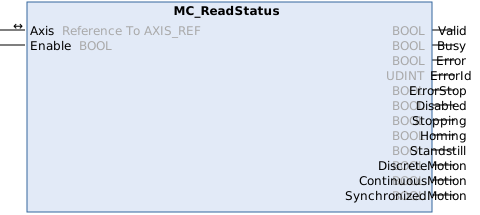
This function block reads the current axis state.
Syntax
Definition:
FUNCTION_BLOCK MC_ReadStatus
VAR_IN_OUT
    Axis               : Reference To  AXIS_REF;
END_VAR
VAR_INPUT
    Enable             : BOOL;
END_VAR
VAR_OUTPUT
    Valid              : BOOL;
    Busy               : BOOL;
    Error              : BOOL;
    ErrorId            : UDINT;
    ErrorStop          : BOOL;
    Disabled           : BOOL;
    Stopping           : BOOL;
    Homing             : BOOL;
    Standstill         : BOOL;
    DiscreteMotion     : BOOL;
    ContinuousMotion   : BOOL;
    SynchronizedMotion : BOOL;
END_VAR
 Inputs
|
Name |
Type |
Description |
|---|---|---|
|
Enable |
BOOL |
Read the axis state continuously while Enable = TRUE. |
 Outputs
|
Name |
Type |
Description |
|---|---|---|
|
Valid |
BOOL |
Valid output available at function block |
|
Busy |
BOOL |
Function block is not finished and new output values are to be expected. |
|
Error |
BOOL |
Error occurred within function block. |
|
ErrorId |
UDINT |
Error identifier |
|
ErrorStop |
BOOL |
Axis is in state ErrorStop. |
|
Disabled |
BOOL |
Axis is in state Disabled. |
|
Stopping |
BOOL |
Axis is in state Stopping. |
|
Homing |
BOOL |
Axis is in state Homing. |
|
Standstill |
BOOL |
Axis is in state Standstill. |
|
DiscreteMotion |
BOOL |
Axis is in state DiscreteMotion. |
|
ContinuousMotion |
BOOL |
Axis is in state ContinuousMotion. |
|
SynchronizedMotion |
BOOL |
Axis is in state SynchronizedMotion. |
Further information
Alternatively, the axis status can be read from the PLC using the AXIS_REF structure.
myAxis.McToPlc.Std.AxisStateInformation about the individual states is summarized in the section State diagram.
Possible error codes
For this function block, the following values, among others, are possible for the ErrorId output:
Error(Hex) | Error(Dec) | Error type | Description |
|---|---|---|---|
0x8145 | 33093 | Function Block | Mapping of cyclic interface between NC and PLC is missing (e.g., AXIS_REF, AXES_GROUP_REF, ...). A reference used by the function block (e.g., to an axis, group, mover or other motion object) is not linked to the corresponding NC object, or its cyclic mapping is incomplete. |
An overview of all NC error codes can be found here:
Version information
- TwinCAT Standard >= v3.1.4026.23.1
- TF5500 MC3 Base >= v4.0.6