Identify the valve characteristics via PLC

Adding the Tc3_Mc3FluidPower PLC library

An MC3 FluidPower axis was moved during manual operation;
see Move the axis in manual operation using Motion UI
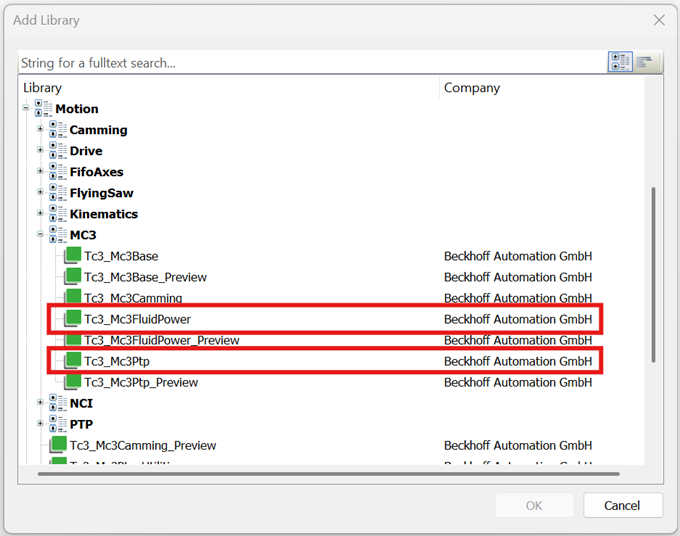
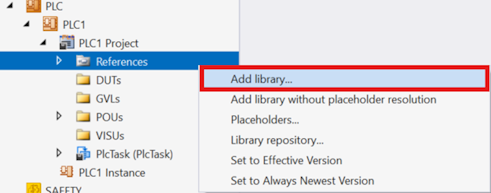
1. Right-click the References node > Add library...
Identify the valve characteristics via PLC 1:
2. In the Add Library dialog under Motion→MC3, make the choice of the Tc3_Mc3FluidPower and Tc3_Mc3Ptp libraries and click OK to confirm.
Identify the valve characteristics via PLC 2:

PLC implementation

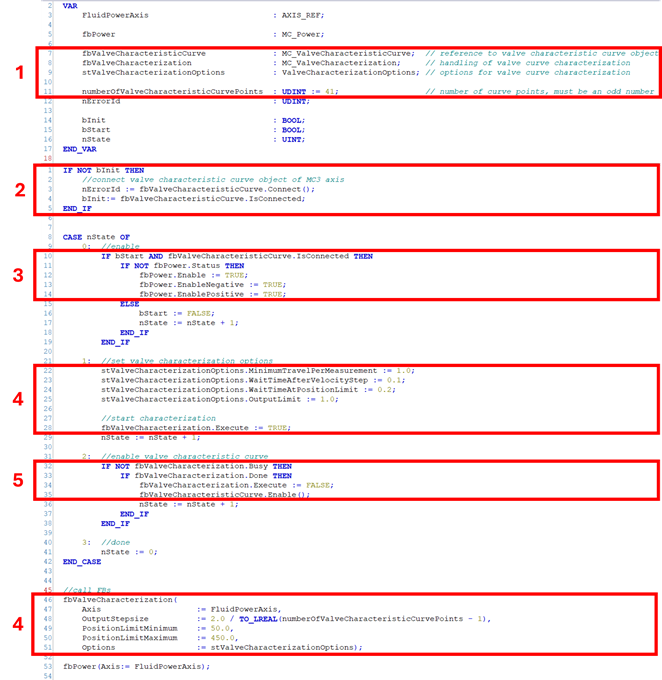
  1. Create one instance each of
    Tc3_Mc3FluidPower.MC_ValveCharacteristicCurve (see MC_ValveCharacteristicCurve),
    Tc3_Mc3FluidPower.MC_ValveCharacterization (see MC_ValveCharacterization),
    Tc3_Mc3FluidPower.ValveCharacterizationOptions (see ValveCharacterizationOptions),
    and the desired number of characteristic curve points numberOfValveCharacteristicCurvePoints.
  2. Make a connection between the reference Tc3_Mc3FluidPower.MC_ValveCharacteristicCurve and the Valve Characteristic Curve object of the FluidPower axis
  3. Powering the FluidPower axis
  4. Setting the options and starting the characterization of the valve characteristics
  5. After successfully identifying the characteristic curve, activate the characteristic curve
    Identify the valve characteristics via PLC 3:
VAR
    FluidPowerAxis                            : AXIS_REF;
                 
    fbPower                                   : MC_Power;
                 
    fbValveCharacteristicCurve                : MC_ValveCharacteristicCurve;    // reference to valve characteristic curve object
    fbValveCharacterization                   : MC_ValveCharacterization;       // handling of valve curve characterization
    stValveCharacterizationOptions            : ValveCharacterizationOptions;   // options for valve curve characterization
    
    numberOfValveCharacteristicCurvePoints    : UDINT := 41;                    // number of curve points, must be an odd number
    nErrorId                                  : UDINT;
    
    bInit                                     : BOOL;
    bStart                                    : BOOL;
    nState                                    : UINT;
END_VAR
IF NOT bInit THEN
    //connect valve characteristic curve object of MC3 axis
    nErrorId := fbValveCharacteristicCurve.Connect();
    bInit:= fbValveCharacteristicCurve.IsConnected;
END_IF


CASE nState OF
    0:  //enable
        IF bStart AND fbValveCharacteristicCurve.IsConnected THEN
            IF NOT fbPower.Status THEN
                fbPower.Enable := TRUE;
                fbPower.EnableNegative := TRUE;
                fbPower.EnablePositive := TRUE;
            ELSE
                bStart := FALSE;
                nState := nState + 1;
            END_IF
        END_IF

    1:  //set valve characterization options
        stValveCharacterizationOptions.MinimumTravelPerMeasurement := 1.0;
        stValveCharacterizationOptions.WaitTimeAfterVelocityStep := 0.1;
        stValveCharacterizationOptions.WaitTimeAtPositionLimit := 0.2;
        stValveCharacterizationOptions.OutputLimit := 1.0;
        
        //start characterization
        fbValveCharacterization.Execute := TRUE;
        nState := nState + 1;
    
    2:  //enable valve characteristic curve
        IF NOT fbValveCharacterization.Busy THEN
            IF fbValveCharacterization.Done THEN
                fbValveCharacterization.Execute := FALSE;
                fbValveCharacteristicCurve.Enable();
                nState := nState + 1;
            END_IF
        END_IF
    3:  //done
        nState := 0;
END_CASE


//call FBs
fbValveCharacterization(
    Axis                    := FluidPowerAxis,
    OutputStepsize          := 2.0 / TO_LREAL(numberOfValveCharacteristicCurvePoints - 1),
    PositionLimitMinimum    := 50.0,
    PositionLimitMaximum    := 450.0,
    Options                 := stValveCharacterizationOptions);

fbPower(Axis:= FluidPowerAxis);

Linking MC3 axis/PLC

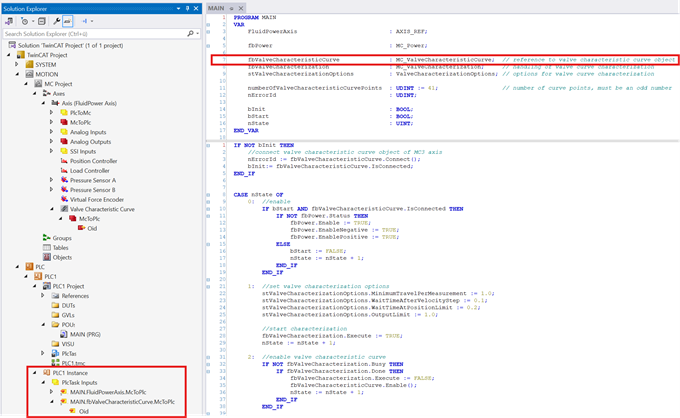
3. Create the PLC project
→ The Tc3_Mc3FluidPower.MC_ValveCharacteristicCurve instance appears under PLC Instances in Solution Explorer.
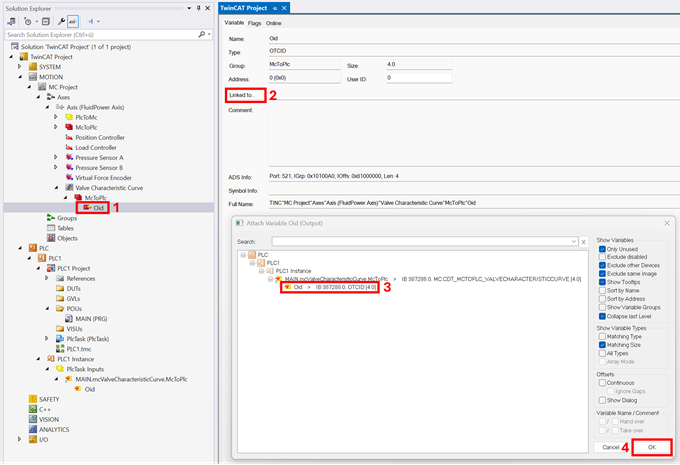
Identify the valve characteristics via PLC 4:
4. Link the PLC instance to the Valve Characteristic Curve instance in MC3.
Identify the valve characteristics via PLC 5:
5. Activate the TwinCAT project.