Valve characteristics
The MC3 FluidPower axis enables the implementation and automatic recording of the valve characteristics. This is connected downstream of the position or force/pressure controller.
By determining the characteristic curve in the moving system, all nonlinear properties of the hydraulic system are identified and eliminated. In other words, in addition to the valve's flow characteristic curve, the characteristic curve also includes the nonlinear effects of oil flow through hydraulic blocks, hoses, and pipes, as well as those of the hydraulic cylinder.
Curve
In the Curve tab of the valve characteristics object, an existing valve characteristic is displayed in tabular form and as a graph.
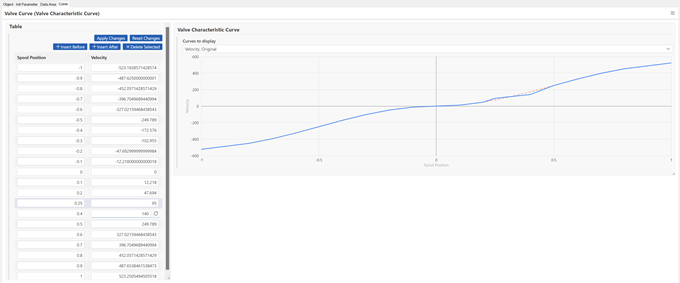
Table
In the “Table” card, you can make changes to existing points on the valve characteristics curve. Likewise, using the buttons
- Insert Before
- Insert After
- Delete Selected
points can be added or removed.
Changes are, using the buttons
- Apply changes
- Reset changes
saved or reset.
Valve Characteristic Curve
The “Valve characteristic curve” card displays a graphical representation of the current valve characteristics. The “Curves to display” selection provides the following options:
- Velocity
- Original
By default, “Velocity” is enabled. This selection displays the currently configured curve.
Selecting the “Original” checkbox also displays the most recently saved valve characteristic curve.
For information on the parameters of the valve characteristics object, see Valve Characteristic Curve.
For an explanation of the menu, see Setting options.