Side Bar
The sidebar is located on the left edge of Motion UI. It contains the Basic Controls and can be collapsed by clicking the small arrow labeled  in the upper-right corner.
The sidebar cannot be customized, and its content is predetermined.
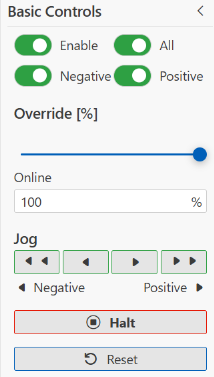
Manual movement via keyboard controls
You can also use the keyboard instead of the jog buttons. The user must first enable this option in the settings. The following keys are assigned to the actions:
Action | Optional keyboard operation |
|---|---|
Slow movement in the positive direction using the manual control buttons | → (Right arrow key) |
Rapid movement in the positive direction using manual control buttons | ↑ (Up arrow key) |
Slow movement in the negative direction using the manual control buttons | ← (Left arrow key) |
Rapid movement in the negative direction using the manual control buttons | ↓ (Down arrow key) |
Halt | Space bar |