Overview: MC3 types
MC3 function blocks use typed axis references to define the required capabilities of an axis. Each type represents a specific motion ability. This capability could, for example, be the ability to act as a coupling master or the axis's ability to receive a position setpoint. Each motion object (AXIS_REF, ENCODER_AXIS_REF) implements only the capabilities that it actually supports.
The compiler checks whether the motion object implements the types required by the function block. If this is not the case, the program cannot be compiled. This prevents operations from being called on motion objects that do not support them. The function block only queries skills, not the motion object itself. The compiler checks whether the motion objects implement this capability.
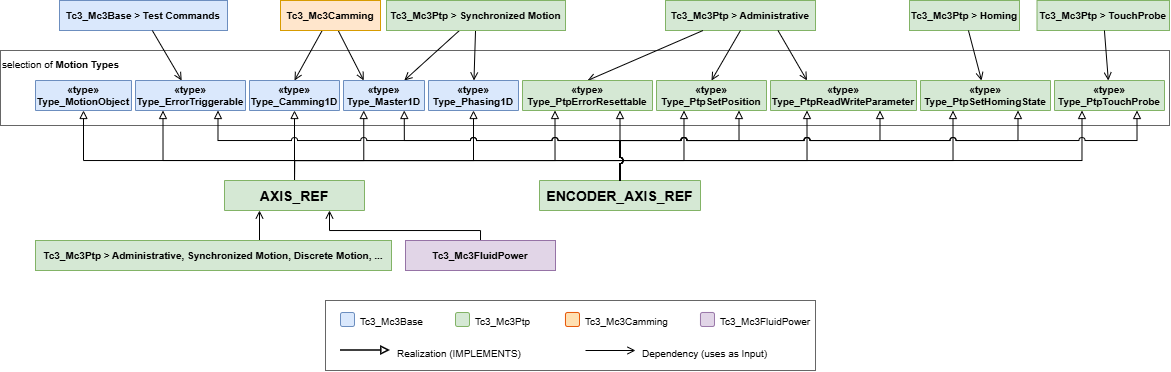
The diagram outlines the dependencies and origins of the types (Type_*) and motion objects (AXIS_REF, ENCODER_AXIS_REF). The key levels can be seen in the center:
- Types:
Type_Master1D, etc., which define what a motion object can do. - Motion objects:
AXIS_REFandENCODER_AXIS_REF, which are declared in the PLC program.
The MC3 function blocks use the specialized motion objects or the types directly.
Type | AXIS_REF | ENCODER_AXIS_REF |
|---|---|---|
Type_PtpErrorResettable | X | X |
Type_PtpReadWriteParameter | X | X |
Type_PtpSetHomingState | X | X |
Type_PtpSetPosition | X | X |
Type_PtpTouchProbe | X | X |
Type_Camming1D | X |
|
Type_ErrorTriggerable | X | X |
Type_Master1D | X | X |
Type_MotionObject | X |
|
Type_Phasing1D | X |
|
Use
The function blocks Tc3_Mc3Base, Tc3_Mc3Ptp, Tc3_Mc3Camming, and Tc3_Mc3FluidPower require parameterization using specialized types (Type_*) or more general motion objects (AXIS_REF). The diagram above shows that the more general motion objects implement selected types.
- 1. In the PLC, create an instance of the
AXIS_REFtype for a PTP or hydraulic axis as usual. The specialized types are not suitable for use as standalone instances. - 2. In addition to
AXIS_REF, other motion objects with various capabilities can be instantiated (e.g., a position sensor asENCODER_AXIS_REF). - Functions blocks can only be used with motion objects that provide the necessary capabilities. It is not possible to run a
MC_MoveAbsolutewith aENCODER_AXIS_REF. This causes a compiler error.
Using these types - for example, with coupling function blocks - allows the function blocks to be reused with different Motion objects. For a function block input of type Type_Camming1D, it is clear that this parameter requires an object that can act as a slave object for cam plates. Incorrect use of motion objects is detected during compilation, not just at runtime of the user program.
The table shows a choice of function blocks and the motion objects or types used.
Function block | Parameter | Required type | AXIS_REF | ENCODER_AXIS_REF |
|---|---|---|---|---|
Basic Commands | ||||
MC_Power | Axis | AXIS_REF | X | - |
MC_Home | Axis | AXIS_REF | X | - |
MC_SetHomingState | Axis | Type_PtpSetHomingState | X | X |
MC_Stop | Axis | AXIS_REF | X | - |
MC_Halt | Axis | AXIS_REF | X | - |
MC_Reset | Axis | Type_PtpErrorResettable | X | X |
MC_MoveAbsolute | Axis | AXIS_REF | X | - |
MC_MoveRelative | Axis | AXIS_REF | X | - |
MC_MoveVelocity | Axis | AXIS_REF | X | - |
MC_MoveModulo | Axis | AXIS_REF | X | - |
MC_SetOverride | Axis | AXIS_REF | X | - |
MC_SetPosition | Axis | Type_PtpSetPosition | X | X |
MC_ReadParameter | Axis | Type_PtpReadWriteParameter | X | X |
MC_WriteParameter | Axis | Type_PtpReadWriteParameter | X | X |
MC_ReadBoolParameter | Axis | Type_PtpReadWriteParameter | X | X |
MC_WriteBoolParameter | Axis | Type_PtpReadWriteParameter | X | X |
MC_ReadHardwareParameter | Axis | AXIS_REF | X | X |
MC_WriteHardwareParameter | Axis | AXIS_REF | X | X |
Gear coupling | ||||
MC_GearIn | Master | Type_Master1D | X | X |
Slave | AXIS_REF | X | - | |
MC_GearInPos | Master | Type_Master1D | X | X |
Slave | AXIS_REF | X | - | |
Cam plates | ||||
MC_CamIn | Master | Type_Master1D | X | X |
Slave | Type_Camming1D | X | - | |
MC_CamTableSelect | Slave | Type_Camming1D | X | - |
Phasing | ||||
MC_PhasingAbsolute | Master | Type_Master1D | X | X |
Slave | Type_Phasing1D | X | - | |
MC_PhasingRelative | Master | Type_Master1D | X | X |
Slave | Type_Phasing1D | X | - | |
Touch Probe | ||||
MC_TouchProbe | Axis | Type_PtpTouchProbe | X | X |
TriggerInput | TRIGGER_REF | separate type | ||
MC_AbortTrigger | Axis | Type_PtpTouchProbe | X | X |
TriggerInput | TRIGGER_REF | separate type | ||
Example
Declaration:
VAR
    myAxis1        : AXIS_REF;
    myAxis2        : AXIS_REF;
    myEncoder      : ENCODER_AXIS_REF;
    myGearIn       : MC_GearIn;
    myTypeInstance : Type_Master1D;
END_VAR
Implementation:
// valid call
myGearIn(
    Master:= myAxis1,
    Slave:= myAxis2,
    Execute:= TRUE);
// valid call
myGearIn(
Master:= myEncoder,
Slave:= myAxis2,
Execute:= TRUE);myGearIn(
Master:= myAxis1,
Slave:= myEncoder, // Compiler error
Execute:= TRUE);myGearIn(
Master:= myTypeInstance, // FB runtime error 16#8145
Slave:= myAxis2,
Execute:= TRUE);The MC_GearIn command expects an object of type AXIS_REF at the Slave input. Therefore, it is not possible to use an encoder axis of the type ENCODER_AXIS_REF; doing so will result in a compiler error. The same applies, for example, to the command MC_CamIn, since ENCODER_AXIS_REF does not offer the type Type_Camming1D.
MC3 types do not contain any implementation code. They are not available in Solution Explorer for creating a link between an MC3 axis and an instance in the PLC. In the last example, an instance of the type Type_Master1D is assigned to the Master input. This does not result in a compiler error, since the type is essentially correct. However, the function block's logic detects that a link to an axis is missing and reports this with error 16#8145.
Migrating from NC2 to MC3
NC2 | MC3 | Required action |
|---|---|---|
|
| None – In MC3, the function blocks use the motion objects or types as input. Since the motion objects provide the appropriate types, there is no need to change the input to the function block or the declaration. |
|
| For encoder axes, select the standalone |