Touch probe modules
The use of touch probe modules allows the detection of an axis position at the time of a trigger event. This can be a digital signal that replicates the function of a touch probe. It is also possible to determine the timestamp at which the axis reaches a defined position.
Add a touch probe module
Follow the steps below to add additional touch probe modules. Drive modules, such as the DS402 (AX8xxx), MDP742 (ELM72xx), or Sercos (AX5xxx), already include touch probe functions. No additional touch probe modules need to be added; you simply need to enable the cyclic process data and link it to the appropriate I/O device (either manually or through configuration in Drive Manager). In the PLC, a corresponding TRIGGER_REF (note derived ref objects) can be linked.
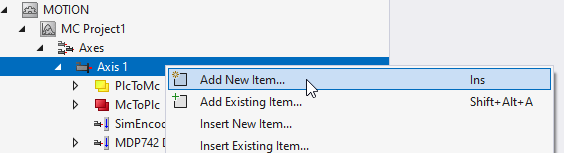
- 1. Right-click Axes > Axis > Add New Item...
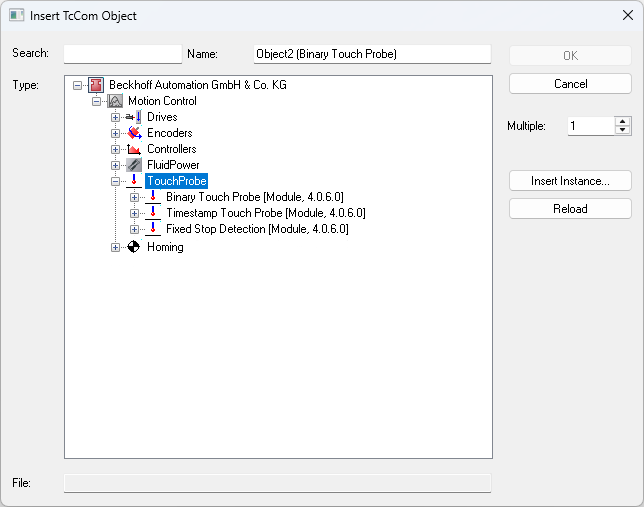
- 2. In the Insert TcCOM Object dialog box, navigate to the TouchProbe group under Type and the Motion Control group.
- 3. Expand this group if necessary.
- 4. Select the appropriate touch probe module and complete the process by clicking the OK button. Be sure to select the same module version as the one used for existing Motion Control objects in the Solution.