CamScalingData: Using Master/SlaveOffsetMode
Examples of using ECamOffsetMode.Absolute/Relative in combination with CamActivationMode
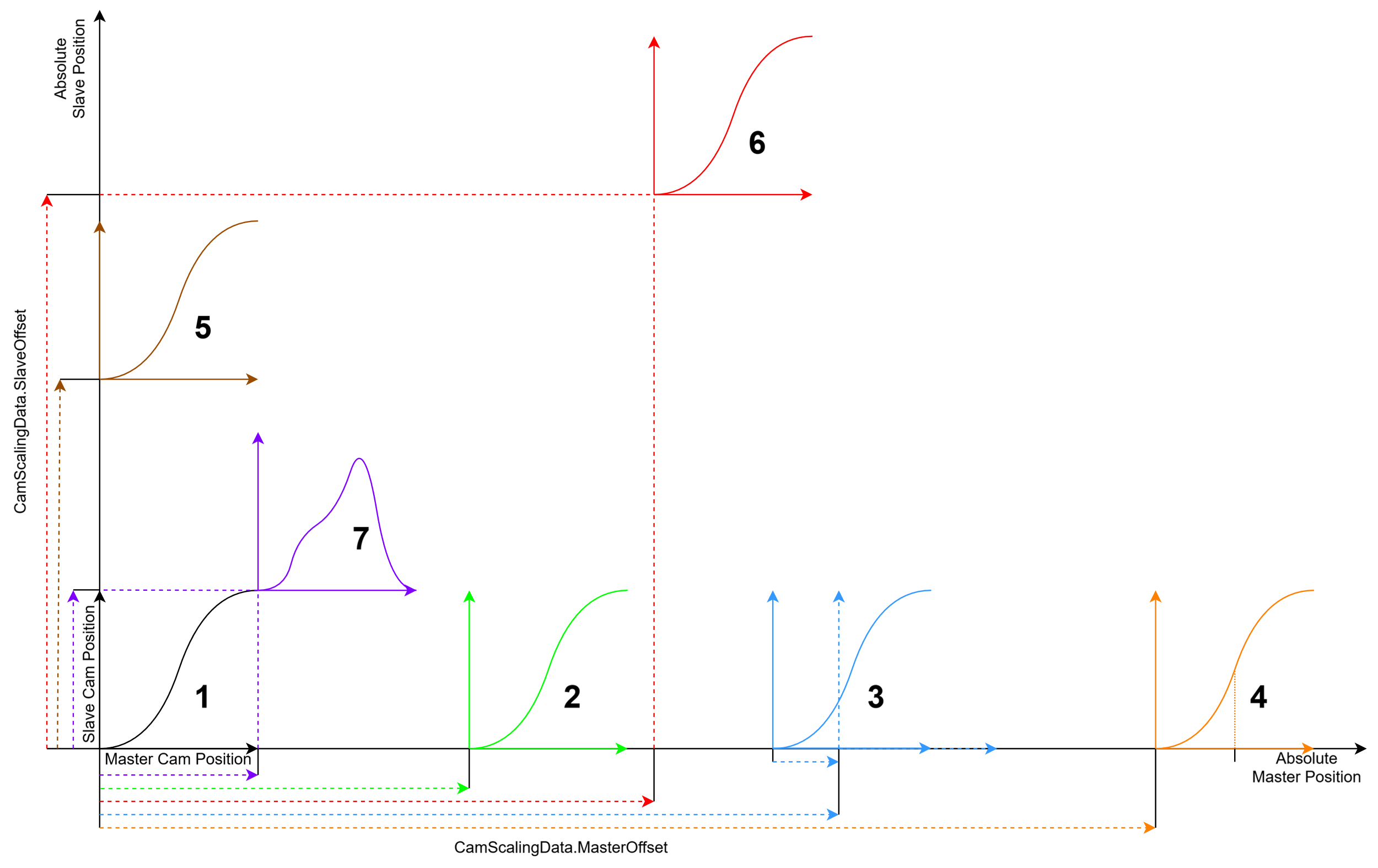
- No offset, instant activation/switching
- MasterOffsetMode = None, SlaveOffsetMode = None, ActivationMode = Instantaneous
- MasterOffsetMode = None, SlaveOffsetMode = None, ActivationMode = AtMasterCamPosition, ActivationPosition = 0.0
- MasterOffsetMode = None, SlaveOffsetMode = None, ActivationMode = AtMasterAbsolutePosition, ActivationPosition = 0.0
- Master offset (SlaveOffsetMode = None)
- MasterOffsetMode = Absolute, MasterOffset = 100, ActivationMode = Instantaneous
- MasterOffsetMode = Absolute, MasterOffset = 100, ActivationMode = AtMasterAbsolutePosition, ActivationPosition = 100
- MasterOffsetMode = Absolute, MasterOffset = 100, ActivationMode = AtMasterCamPosition, ActivationPosition = 0
- MasterOffsetMode = Relative, MasterOffset = 0, ActivationMode = AtMasterAbsolutePosition, ActivationPosition = 100
- Relative master offset
- MasterOffsetMode = Relative, MasterOffset = -10, ActivationMode = AtMasterAbsolutePosition, ActivationPosition = 200
- The slave position jumps at the dashed line. This is the point at which the cam plate becomes active.
- Master offset with ActivationPosition (recommended if the first section of a cam plate is not to be considered)
- MasterOffsetMode = Absolute, MasterOffset = 300, ActivationMode = AtMasterCamPosition, ActivationPosition = 10
- MasterOffsetMode = Absolute, MasterOffset = 300, ActivationMode = AtMasterAbsolutePosition, ActivationPosition = 310
- The slave position jumps at the dashed line. This is the point at which the cam plate becomes active.
- Slave Offset (MasterOffsetMode = None)
- SlaveOffsetMode = Absolute, SlaveOffset = 100, ActivationMode = Instantaneous
- SlaveOffsetMode = Relative, SlaveOffset = 100, ActivationMode = Instantaneous
- Master and slave offset
- MasterOffsetMode = Absolute, MasterOffset = 150, SlaveOffsetMode = Absolute, SlaveOffset = 150, ActivationMode = Instantaneous
- MasterOffsetMode = Relative, MasterOffset = 150, SlaveOffsetMode = Relative, SlaveOffset = 150, ActivationMode = Instantaneous
- No offset; activation/switching at the end/start of a cam plate
- MasterOffsetMode = None, SlaveOffsetMode = None, ActivationMode = AtBoundary
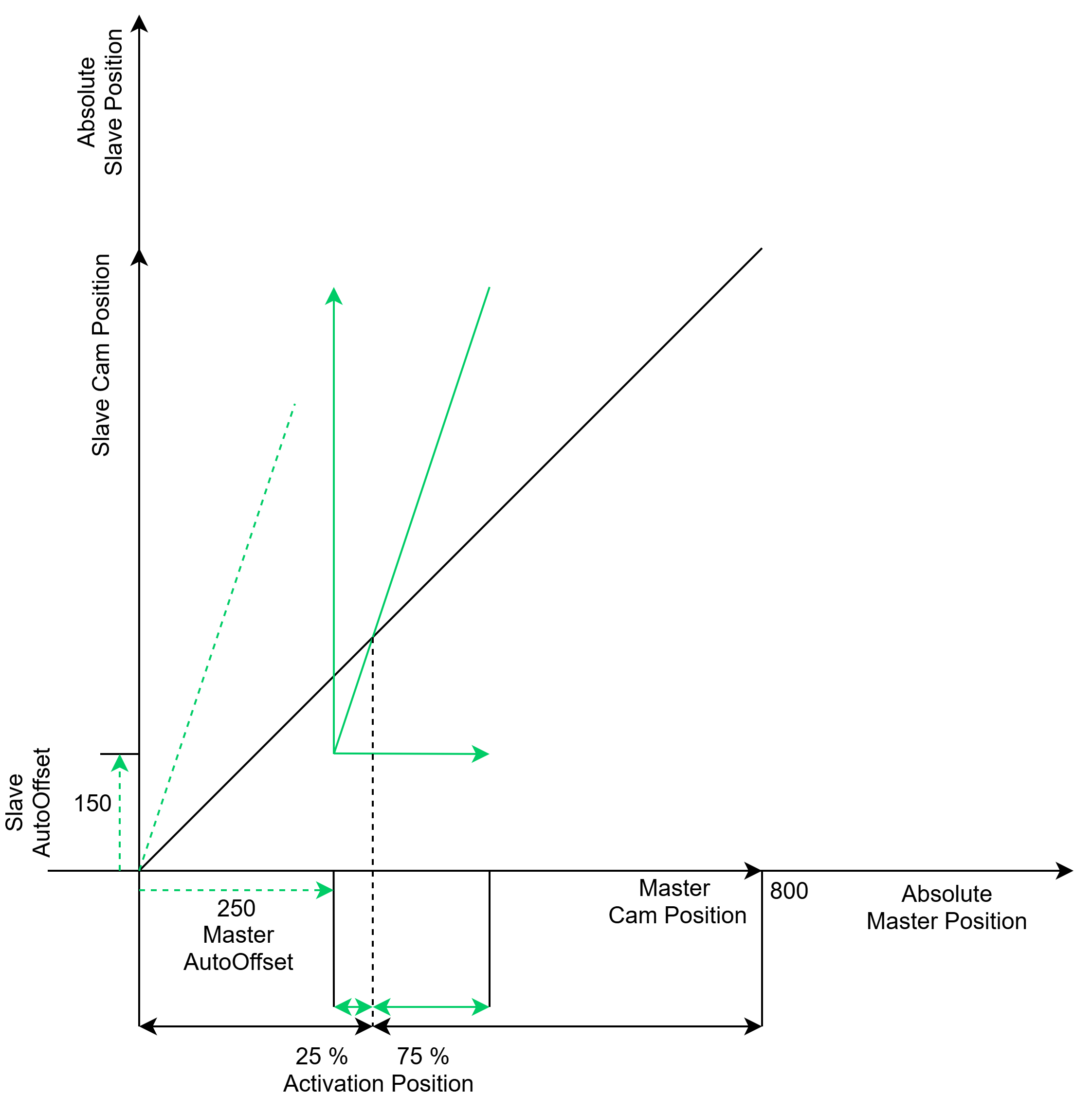
Using ECamOffsetMode.AutoOffset
The ECamOffsetMode.AutoOffset mode ensures automatic adjustment of the cam plate offset. ECamOffsetMode.AutoOffset can be applied independently to the master and slave axes of a cam plate. To use AutoOffset, a cam plate must already be active. This means that the AutoOffset mode can be used when switching between or scaling cam plates.
Compared to TF5050 TwinCAT 3 NC Camming with MC_CamScalingMode and MC_StartMode, these settings are grouped under the enumeration type ECamOffsetMode in TF5550 TwinCAT 3 MC3 Camming. The ECamOffsetMode.AutoOffset setting can be used to prevent a jump in the position of the master and/or slave axis.
Examples of using ECamOffsetMode.AutoOffset for the master axis
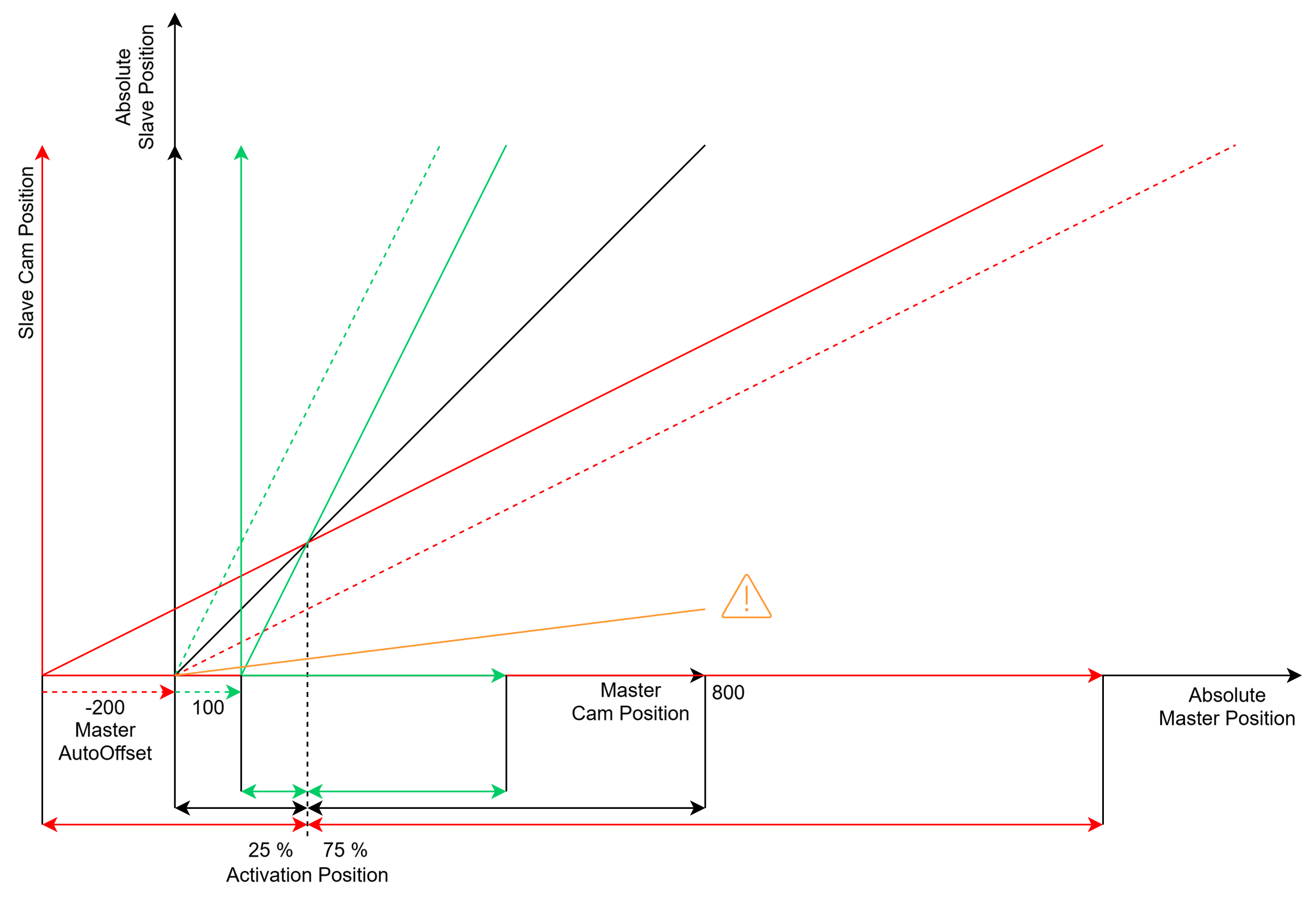
In the diagram shown, the cam plate is depicted in black color. The goal is to switch to the red, green, or orange cam plate. The original position of each cam plate (without offset) is shown with a dashed line, and the resulting position is shown with a solid line in the corresponding color. The switch occurs at a defined activation position (at Master Cam position 200 in the diagram).
ECamOffsetMode.AutoOffset for the master axis determines the master offset of the cam plate such that the master position within the cam plate is maintained. For master scaling or switchover to a cam plate with a different master cycle, this means that the relative (percentage) position before and after the switchover is identical. In this case, the red cam plate is automatically assigned a master offset of -200, and the green cam plate is assigned an offset of 100.
The red and green cam plates allow for adjustment, ensuring that no discontinuities occur even in the slave position.
In the example of the orange cam plate, there is no shift or automatic adjustment of the offset. The master scale, or master period, is the same for both the black and orange cam plates. In this case, the master position is maintained by the AutoOffset mode. Please note that the slave position jumps at the moment of switching.
Examples of using ECamOffsetMode.AutoOffset for the slave axis
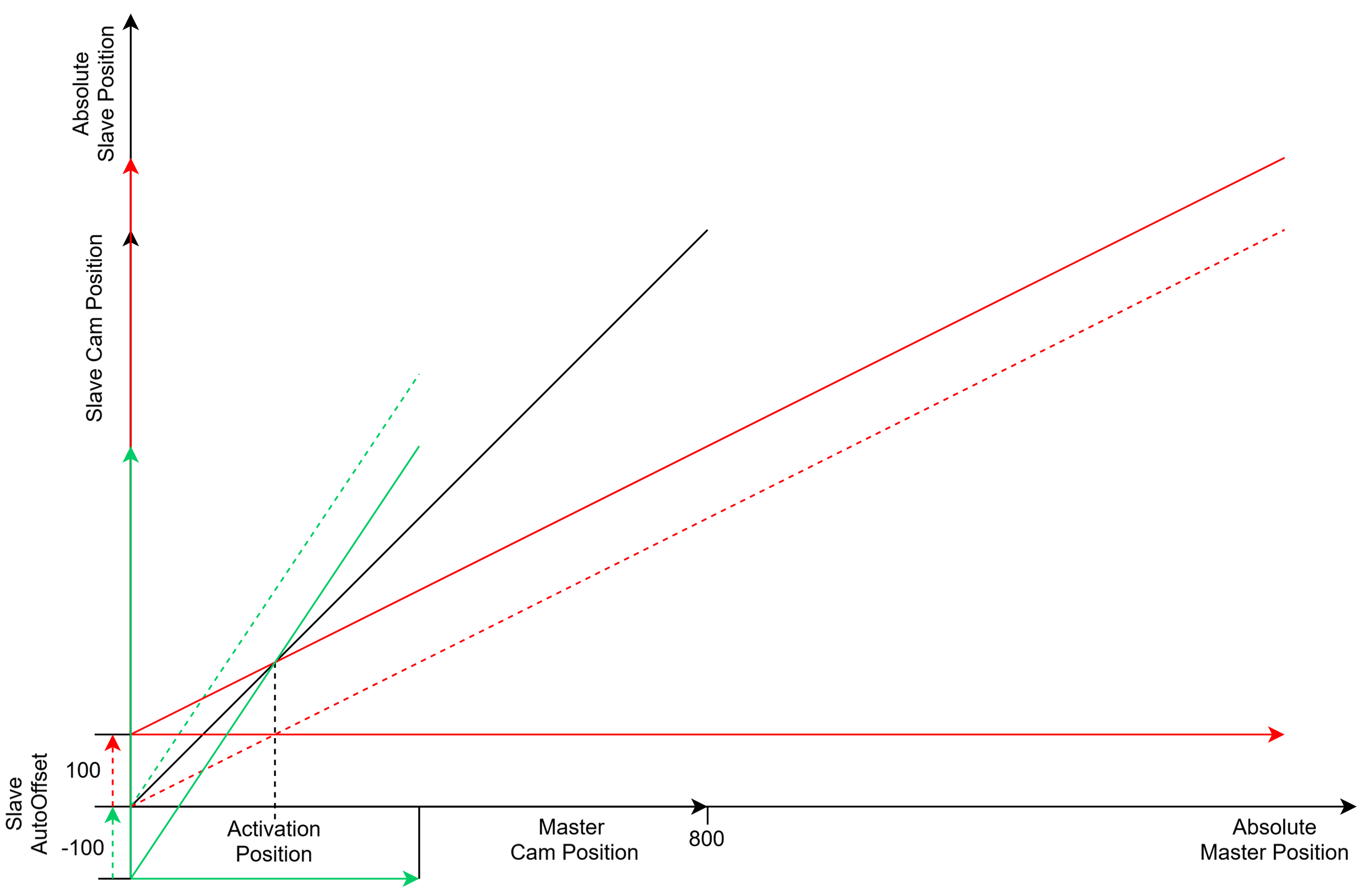
ECamOffsetMode.AutoOffset for the slave axis calculates the offset such that no discontinuities in the slave position occur during cam plate switching or scaling. The cam plate offset is adjusted to ensure that the slave position is identical before and after the action.
Examples of using ECamOffsetMode.AutoOffset for the master and slave axes
If ECamOffsetMode.AutoOffset is used for both the master axis and the slave axis during cam plate switching or scaling, the master offset is calculated first, followed by the slave offset.