Create a cam plate
In MC3, the functions and operations related to cam plates are centralized in the MC_CamObject function block. The Tc3_Mc3Camming library provides access to familiar PLCopen function blocks. In addition, the MC_CamObject class provides methods for creating and modifying cam plates, as well as readable properties of the active cam plate.
- A cam plate can be preconfigured in the project during configuration.
- 1. Open Axes > Tables.
- 2. Right-click the table in the structure tree and open the Insert TcCOM Object dialog.
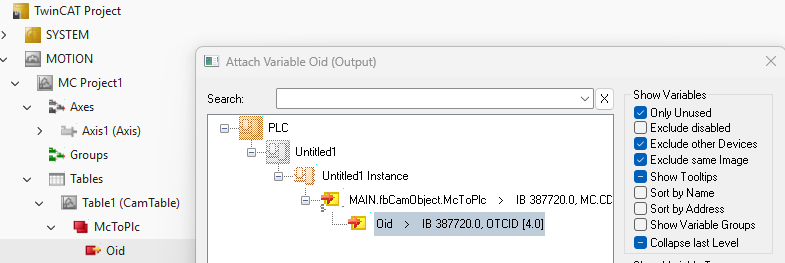
- In this case, the object ID of the module or TcCOM object must be linked to an MC_CamObject in the PLC.
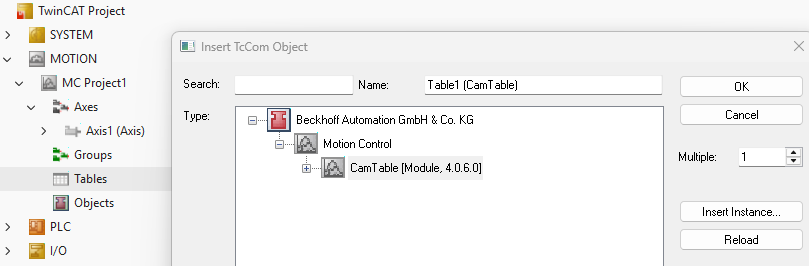
- At runtime, this connection is then initialized using the MC_CamObject.Connect() method.
- Alternatively, a cam plate can also be created at runtime. A TcCOM module is created by calling the MC_CamObject.Create() method from the PLC. In this case, linking and further initialization are not necessary.
Fill a cam plate with MotionFunctionPoint as interpolation points
After successfully creating a cam plate object, it is then populated with the desired data points and interpolation functions. The definition of an individual data point is provided by the MotionFunctionPoint structure. Using the MC_CamObject.WriteData() method, a series of data points (an array of MotionFunctionPoints) can be loaded synchronously into the cam plate object. Once this method has completed, the basic configuration of the cam plate is complete, and axes can be coupled using the defined relationship.
PROGRAM MAIN
VAR
    fbCamObject          : MC_CamObject;
    fbCamObject2         : MC_CamObject;
    motionFunctionPoints : ARRAY[0..360] OF MotionFunctionPoint;
    bInit                : BOOL;
    i                    : INT;
END_VAR
IF NOT bInit THEN
fbCamObject.Connect();
FOR i:=0 TO 360 DO
motionFunctionPoints[i].Ignored := FALSE;
motionFunctionPoints[i].FunctionType := EMotionFunctionType.CubicSpline;
motionFunctionPoints[i].MasterPosition := i;
motionFunctionPoints[i].SlavePosition := -(COS(INT_TO_LREAL(i) / 360.0 * 2 * PI) - 1) * 100;
motionFunctionPoints[i].SlaveVelocity := STRING_TO_LREAL('#Ignore');
motionFunctionPoints[i].SlaveAcceleration := STRING_TO_LREAL('#Ignore');
motionFunctionPoints[i].SlaveJerk := STRING_TO_LREAL('#Ignore');
END_FOR
fbCamObject.WriteData(SourceData := ADR(motionFunctionPoints), NumberOfPoints := 361, Periodic:=FALSE);
fbCamObject2.Create();
fbCamObject2.CopyFrom(fbCamObject);
bInit:=TRUE;
END_IF