Installation
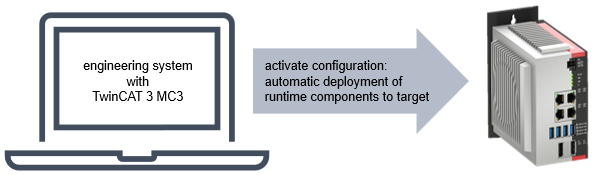
TF55xx | TwinCAT 3 MC3 is installed only on the engineering side. On the runtime side, a TwinCAT Standard installation version 3.1 Build 4026.23.1 or later is required. When the configuration is activated, specific MC3 components are transferred from the engineering system to the runtime system. The operating system on which the runtime system is based is automatically detected and taken into account.
Engineering installation (Windows)
From TwinCAT 3.1 Build 4026, TwinCAT products are installed via the TwinCAT Package Manager. Detailed instructions on installing products can be found in the chapter Managing TwinCAT software in the TwinCAT 3.1 Build 4026 setup instructions.
You can obtain a basic TwinCAT XAE installation using the following workload:
- TwinCAT.Standard.XAE
Basic MC3 components are installed with the following workload:
- TF5500.MC3.Base.XAE
Additional MC3 components can also be installed using the following workloads:
- TF5550.MC3.Camming.XAE
- TF5560.MC3.FluidPower.XAE
In addition, we recommend installing Drive Manager 2 for using and parameterizing Beckhoff Motion hardware, as well as TwinCAT Scope:
- TE5950.DriveManager2.XAE (Engineering) (v1.1.114.0 or later recommended)
- TE1300.ScopeViewProfessional.XAE (Engineering)
- TF3300.ScopeServer.XAR (Runtime)
Runtime installation
On the runtime side, only a TwinCAT Standard installation version 3.1 Build 4026.23.1 or later is required. All necessary TwinCAT MC3 components are transferred from the engineering system to the runtime system when the configuration is activated.
Windows XAR installation via the TwinCAT Package Manager using the following workload:
- TwinCAT.Standard.XAR
Beckhoff RT Linux® Runtime installation via the Beckhoff Linux package server using the following package:
- tc31-xar-um
TwinCAT/BSD Runtime installation:
- The TwinCAT Runtime installation is included in the TwinCAT/BSD installation.