MOTION
The NC2, MC3, and CNC configurations are managed via the MOTION node in the TwinCAT project's tree view in Solution Explorer.
 | This documentation focuses exclusively on the MC3 configuration. |
Display MOTION nodes
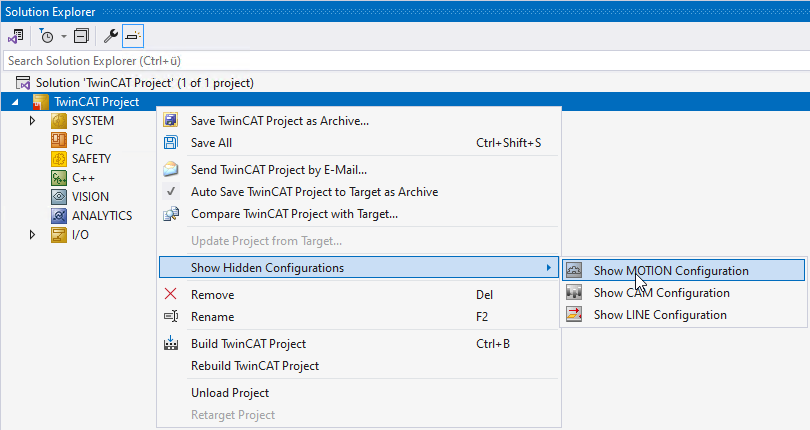
If the MOTION node is not displayed in the TwinCAT system, you can show it by right-clicking on TwinCAT Project > Show Hidden Configurations > Show MOTION Configuration.
Motion Settings tab
The Motion Settings tab allows you to configure motion settings that apply to all child projects (of a given type).
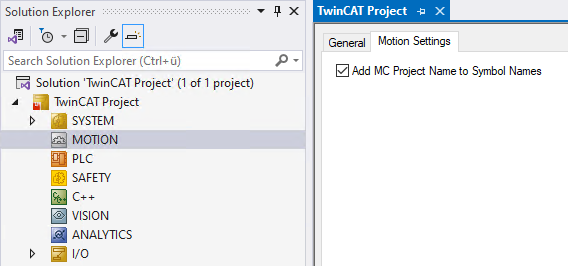
Add MC Project Name to Symbol Names | |
|---|---|
| Default setting If there is only one MC project in a TwinCAT project, the name of the MC project is not included in ADS symbol names. If a TwinCAT project contains multiple MC projects, the ADS symbol names for an MC project begin with the name of the MC project to avoid duplicate ADS symbol names. |
| The ADS symbol names of an MC project begin with the name of the MC project. |
| The ADS symbol names of an MC project do not include the name of the MC project. If there are multiple MC projects within a TwinCAT project, it is the user's responsibility to prevent duplicate ADS symbol names. |


