MC_CalcTrafo
TF5410 | TF5420 | |
|---|---|---|
| MC Group with Pick-and-Place | MC Group Coordinated Motion |
|
|
|


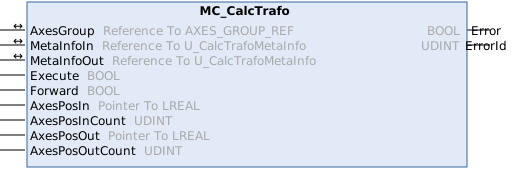
The function block MC_CalcTrafo calculates the forward or inverse kinematic transformation. Accordingly, the function block requires that a kinematic transformation be assigned to the Coordinated Motion group.
 Inputs
VAR_INPUT
    Execute                  : BOOL;
    Forward                  : BOOL;
    AxesPosIn                : Pointer To LREAL;
    AxesPosInCount           : UDINT;
    AxesPosOut               : Pointer To LREAL;
    AxesPosOutCount          : UDINT;
END_VAR
Name | Type | Description |
|---|---|---|
Execute | BOOL | The command is triggered by a rising edge at this input. |
Forward | BOOL | Determines whether the forward or backward transformation is calculated. |
AxesPosIn | Pointer To LREAL | A pointer to an array containing the input positions of the transformation. When calculating a forward transformation, these represent the joint positions. When calculating a backward transformation, these represent the Cartesian axis positions. |
AxesPosInCount | UDINT | Number of input positions |
AxesPosOut | Pointer To LREAL | A pointer to an array containing the resultant positions of the transformation. When calculating a forward transformation, these represent the Cartesian coordinate positions. When calculating a backward transformation, these represent the joint positions. |
AxesPosOutCount | UDINT | Number of result items |
/  Inputs/Outputs
VAR_IN_OUT
    AxesGroup                : AXES_GROUP_REF;
    MetaInfoIn               : U_CalcTrafoMetaInfo;
    MetaInfoOut              : U_CalcTrafoMetaInfo;
END_VAR
Name | Type | Description |
|---|---|---|
AxesGroup | AXES_GROUP_REF | Reference to a group of axes (see Cyclic Group Interface) |
MetaInfoIn | U_CalcTrafoMetaInfo | If multiple robot configurations result in a solution, you can select the solution to be used. For kinematics where this parameter is not required, this input can be assigned a dummy variable. |
MetaInfoOut | U_CalcTrafoMetaInfo | If multiple solutions are possible for a transformation, the solution found is specified. For kinematics where this parameter is not required, this input can be assigned a dummy variable. |
Outputs
VAR_OUTPUT
    Error                    : BOOL;
    ErrorId                  : UDINT;
END_VAR
Name | Type | Description |
|---|---|---|
Error | BOOL | This output becomes TRUE if an error has occurred during command execution. |
ErrorId | UDINT | Contains the command-specific error code of the last executed command. Details of the error code can be found in the ADS error documentation or in the NC error documentation (error codes 0x4nnn and 0x8nnn). |
Requirements
Development environment | Target platform | PLC libraries to include |
|---|---|---|
TF5400 Advanced Motion Pack V3.4.60 | PC oder CX (x64) | Tc3_McCoordinatedMotion, Tc2_MC2 |