Version control
Starting with version 4.0.12, the TF5400 TwinCAT Advanced Motion Pack can be installed on the engineering system in different versions:
- A version between 3.2.60 and 3.4.67, hereinafter also referred to as “unversioned”.
- All versions >= 4.0.12
However, only one version may be used within a TwinCAT project. This applies to both the motion modules and the libraries that are installed with TF5400.
Setting the version for motion objects in existing projects
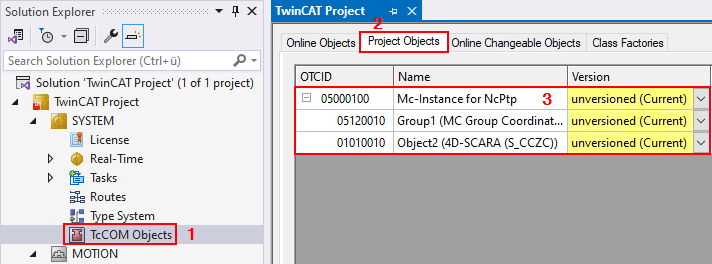
- 1. In the structure tree, select the node SYSTEM > TcCOM Objects (1).
- 2. Go to the Project Objects tab (2).
- All of the project’s TcCOM objects are listed there (3). With regard to the TF5400 TwinCAT Advanced Motion Pack, the “Mc-Instance for NcPtp” and all its child objects are relevant.
- 3. In the Version column, select the desired version of an object.
- The currently loaded and active version of an object is identified as x.x.x.x (Current), as opposed to the selected version y.y.y.y.
- A version between 3.2.60 and 3.4.67 is marked as “unversioned”.
- Versions of an object for which a newer version is installed on the development system are highlighted in yellow.
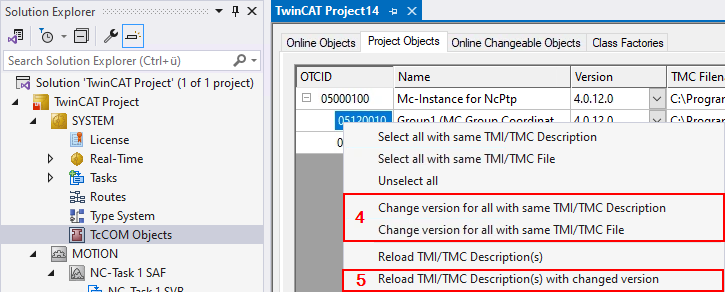
Apply a modified version to multiple objects:
- 4. Select Change version for all with same TMI/TMC Description (4) to apply the version of one object to all other objects of the same type.
With the Change version for all with same TMI/TMC File (4) option, you apply the version to all objects from the same TMC file, for example, to axes and their subordinate drive/encoder objects. - Finally, a modified version of an object must be activated.
- 5. To do this, reload the object with the updated version and the associated TMC object description. Select Reload TMI/TMC Description(s) with changed version (5).