Checking whether a scene exists
Description
The function block KRC_ConvSceneExists is used to check whether a given scene on the selected conveyor exists at the moment. The different input parameters of the function block can be used to define the following:
- the scene desired to be checked
- the offsets added to the start and end of the work area
- the offset added to the end of the synchronization area
- the offset added to the alarm distance
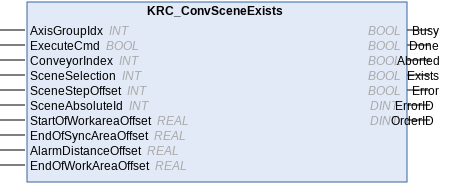
Inputs
Parameter | Type | Description |
|---|---|---|
AxisGroupIdx | INT | Index of axis group
|
ExecuteCmd | BOOL | Starts execution in the case of a rising edge of the signal. |
ConveyorIndex | INT | Index of conveyor
|
SceneSelection | INT | Scene to be tracked
|
SceneStepOffset | INT | Only used if value of SceneSelection is set to StepScenes. Number of scenes to be skipped between two consecutive scenes |
SceneAbsoluteId | INT | Only used if value of SceneSelection is set to AbsoluteScene. Absolute index of the scene to be tracked |
StartOfWorkAreaOffset | REAL | Offset added to the start of the work area |
EndOfSyncAreaOffset | REAL | Offset added to the end of the synchronization area |
AlarmDistanceOffset | REAL | Offset added to the alarm distance |
EndOfWorkAreaOffset | REAL | Offset added to the end of the work area |
Outputs
Parameter | Type | Description |
|---|---|---|
Busy | BOOL | TRUE = statement is currently being transferred or has already been transferred |
Done | BOOL | TRUE = statement has been executed |
Aborted | BOOL | TRUE = statement has been aborted |
Exists | BOOL | TRUE = scene with given parameters exists at the moment |
Error | BOOL | TRUE = error in function block |
ErrorID | DINT | Error number |
OrderID | DINT | OrderID number |