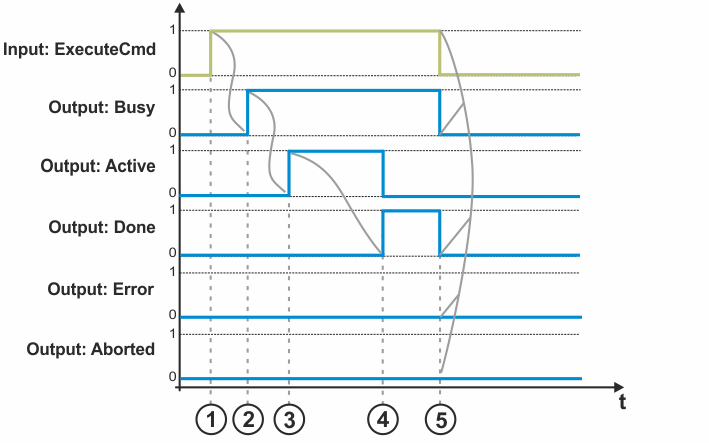
Signal sequence for execution of ExecuteCmd
Example
The signal diagram applies in the following case:
- A statement has been transferred by means of ExecuteCmd and successfully executed.
Item | Description |
|---|---|
1 | The function block is transferred to the robot (= request to execute the statement). |
2 | The statement is transferred. |
3 | The statement is currently being executed. |
4 | The statement was completed successfully. Neither has an error occurred, nor has the statement been aborted, e.g. by KRC_Abort. The Error signal would be set instead of the Done signal in the case of an error, and the Aborted signal would be set instead of the Done signal if the statement is aborted. |
5 | If the ExecuteCmd input is reset, the outputs too are reset. |
Variations
- ExecuteCmd is reset before Done is set. The statement will be executed in this case but the Done signal will not be set. This means there is no confirmation that the statement has been executed.
- ExecuteCmd is reset before Error or Aborted is set. The statement will be aborted in this case but neither the Error nor the Aborted signal will be set. This means there is no confirmation that the statement has been aborted.
- ExecuteCmd is reset before Active is set. In this case, what happens depends on the status of the Busy output:
- If the Busy output is already set, the function block remains in the statement buffer of the robot and is executed according to the FIFO principle.
- If the Busy output is not yet set, the function block is not written to the statement buffer. The statement is therefore not executed.