ADS Remote Procedure Call (RPC)
The ADS RPC block can be used to call TwinCAT 3 methods. The methods must be declared accordingly and are executed when called in the TwinCAT runtime. After execution, the return values of the function and/or function parameters are returned to LabVIEW™.
| |
Access to the control The methods are executed in runtime. When using the real-time runtime, the cycle time must be selected sufficiently. |

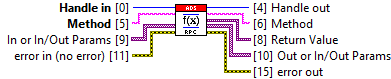
Input/output | Meaning |
|---|---|
Handle | Handle to the ADS client |
Method | Describes an ADS method consisting of the AMS address, the name of the function block and its method:
e.g.: 127.0.0.1.1.1:851::MAIN.fbTest#Method1 |
In or In/Out Params | LabVIEW™ Variant array with all parameters of the method that have the attribute TcRpcDirection := 'in' or TcRpcDirection := 'inout'. |
Out or In/Out Params | LabVIEW™ Variant array with all parameters of the method that have the attribute TcRpcDirection := 'out' or TcRpcDirection := 'inout'. |
Return value | LabVIEW™ Variant as return value from the method, if available. Remains empty for methods without a return value (void). |
In TwinCAT 3, there are many ways to instantiate/define a method, such as in function blocks within the PLC, in an interface, or in a C++ module.
Below, we will look at calling a TwinCAT 3 PLC method called AddNumbers, which adds two positive integers and writes the result to an output parameter. If negative numbers are transferred, the function returns an HRESULT error.
A potential implementation of the method under a function block could look like this:
{attribute 'TcRpcEnable'}
METHOD AddNumbers : HRESULT
VAR_INPUT
{attribute 'TcRpcDirection' := 'in'}
Param1: INT;
{attribute 'TcRpcDirection' := 'in'}
Param2: INT;
END_VAR
VAR_OUTPUT
{attribute 'TcRpcDirection' := 'out'}
Result: INT;
END_VAR
IF Param1 < 0 OR Param2 < 0 THEN
AddNumbers := E_INVALIDARG; // HRESULT error code
Result := 0;
ELSE
Result := Param1 + Param2;
AddNumbers := S_OK; // Success
END_IF
A potential implementation as a C/C++ function signature could look like this:
HRESULT AddNumbers(int16 Param1, int16 Param2, int16& Result);In this case, the ADS RPC block expects exactly two parameters of type int16, as only Param1 and Param2 have been assigned the attribute 'TcRpcDirection=in'.
Choice of methods in the symbol interface
Methods that are defined in Function Blocks (FB) or interfaces are not displayed directly in the Symbol Interface. Only the function block or the interface is visible (e.g. FB_Test).
If the function block or the interface contains methods, these can be selected using the TwinCAT Symbol Interface Configurator:
- Move symbol: Drag the function block or the interface into the Read/Write window.
- Pop-up dialog: A dialog box appears with the message: "This symbol contains public methods. Would you like to make a choice?"
- Confirmation: If Yes is selected, a second window opens for method selection.
- Make your choice: Mark the desired methods and confirm with OK.
The selected methods now appear in the Read window.
Notice | |
Using string parameters The direct use of string parameters can lead to initialization errors in TwinCAT 3 C++ modules. As a best practice, strings should be encapsulated in structured data types, e.g. structs. |