PostgreSQL
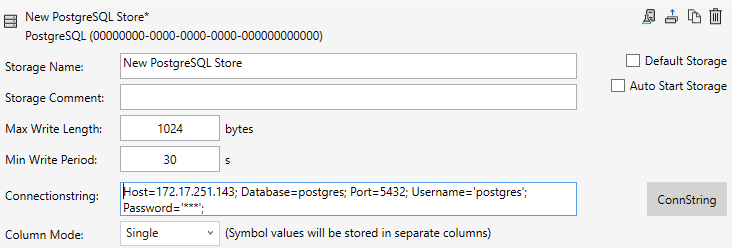
Storage Name:
Assign a descriptive name that describes the purpose of the storage well. It will reappear in various places during configuration in the Manager.
Storage Comment:
You can enter additional information about the storage here.
Max Write Length:
The amount of data that is saved in a tbl_Data record is specified here.
Min Write Period:
This specifies the time period after which at least one tbl_Data record is saved.
Connection String:
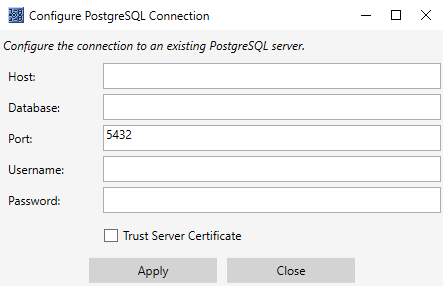
Click on the ConnString button to open the input mask. Make the configuration settings there, including for remote databases that are accessible via network connections.
Column Mode
This option is available only with plain text storage. In Column Mode “Single”, all symbols are stored in separate columns.
Example: Column Mode “Single”
Timestamp | Main.fTest1 | Main.fTest2 | Main.nTest |
|---|---|---|---|
2026-07-14 10:36:01.001 | 0.12 | 0.56 | 1 |
2026-07-14 10:36:01.002 | 0.34 | 0.78 | 2 |
In Column Mode “Grouped”, symbols are sorted according to their base data types and stored in a single column.
Example: Column Mode “Grouped”
Timestamp | Symbol name | fValue | nValue |
|---|---|---|---|
2026-07-14 10:36:01.001 | Main.fTest1 | 0.12 |
|
2026-07-14 10:36:01.001 | Main.fTest2 | 0.56 |
|
2026-07-14 10:36:01.001 | Main.nTest |
| 1 |
2026-07-14 10:36:01.002 | Main.fTest1 | 0.34 |
|
2026-07-14 10:36:01.002 | Main.fTest2 | 0.78 |
|
2026-07-14 10:36:01.002 | Main.nTest |
| 2 |
After starting the storage, communication with the database begins. At this point, the Storage Provider itself creates the required tables. Each recording configuration is saved in a separate table.