Trigger configuration
Start-Stop-GetSample conditions
The TwinCAT Analytics Logger supports event-based streams in which the start, stop, and acquisition of samples are controlled by configurable conditions. There is a separate Trigger tab in the stream settings for this purpose. The start-stop conditions are always available. For both types of conditions, a condition can optionally be enabled. Select the Use Condition checkbox to display the Condition Editor.
The Get Sample Condition is visible only for event-based streams. It controls when an individual sample is captured.
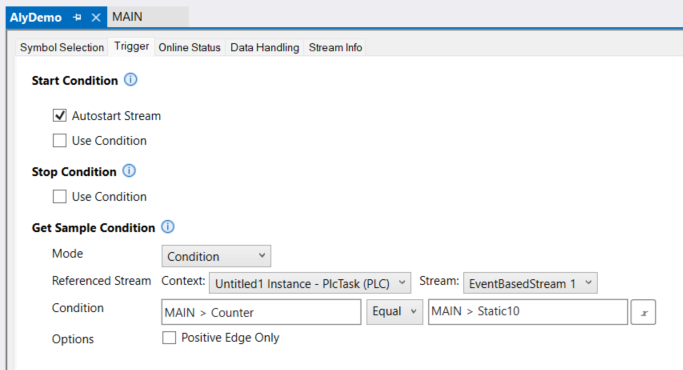
If the Autostart Stream checkbox is selected, the stream starts automatically when the TwinCAT configuration is activated, without requiring a start condition to be met.
Condition Editor
The following options define the event that should trigger the action.
Mode: Here you can choose between the options Condition, On Change, and On Change Ends.
Referenced Stream: The Referenced Stream option allows you to use symbols from a different stream as the basis for the condition. By default, the condition refers to the currently configured stream. To do this, select Context and Stream from the corresponding drop-down lists.
Condition: Configure a condition that triggers the backup. The condition has a left-hand side and, depending on the operator, also a right-hand side.
Constants: To the right of the condition is a button for switching to constant mode. You can use this to enter a constant in the text field.
On Change: In On Change mode, you can configure only the left side of the condition. If the configured variable changes, a backup is triggered.
On Change Ends: With the On Change Ends mode, you can configure only the left side of the condition. When the configured variable stops changing, the action is triggered. (Example: 1 2 3 4 4 [Trigger] 4 4 …)
Options: With the Positive Edge Only option, only positive edges are used to trigger the condition. If this option is activated, the Initial Active option can also be selected. With Initial Active, the condition is satisfied at startup.