Symbol Selection
In the Symbol Selection tab, you can use the checkbox to select the symbols to be communicated by the Analytics Logger. A tree view of your symbols is generated based on the TwinCAT Target Browser. You can manually browse the tree and choose individual symbols or entire paths or function blocks, structures, programs, etc.
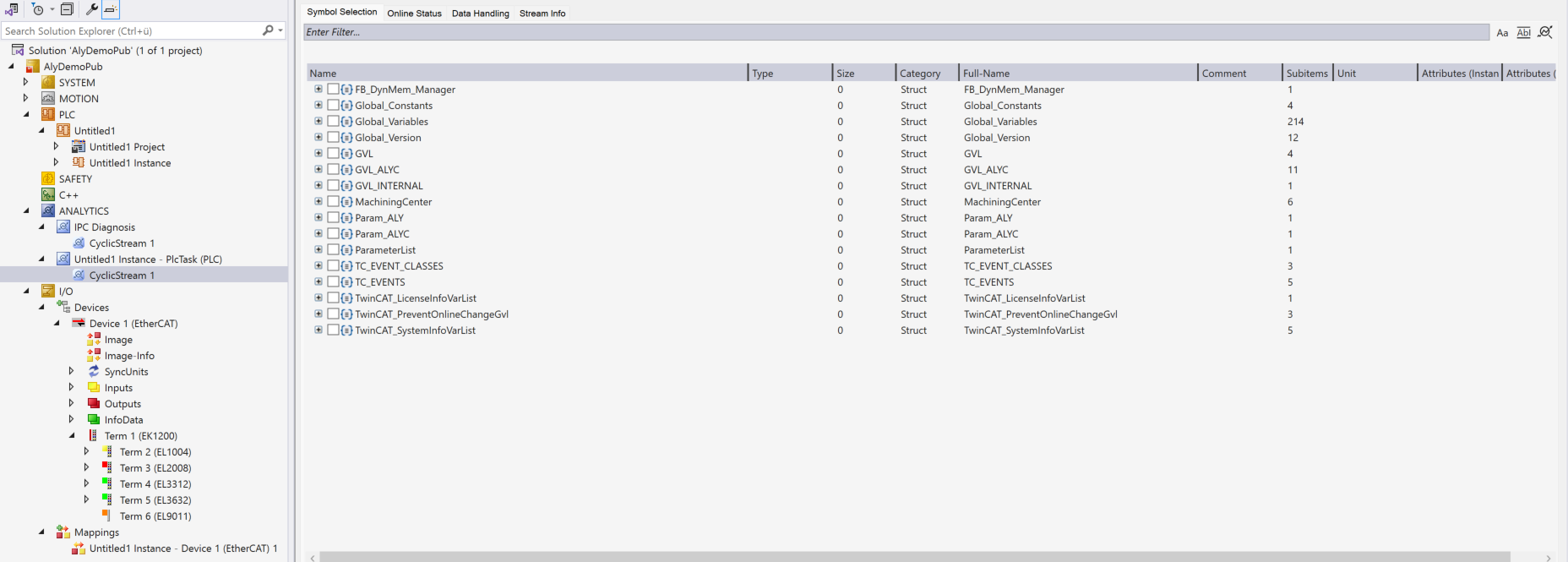
The Target Browser integration has been available since Analytics Logger version 33.2.0. Previously, it was only possible to communicate variables, structures etc. if an attribute was set as pre-compile information in the PLC. The attribute is {attribute 'TcAnalytics'}.
This is no longer mandatory since the version mentioned. You can browse through your project with the Target Browser and select everything by checkbox. However, you can continue to use the attribute and use it as a filter in the Target Browser Integration. This will automatically display the older Analytics Logger versions.
The built-in filter function offers additional functionalities. To reduce the tree view of symbols in a targeted manner, you can use the filter bar and enter name fragments, data types, units etc.
For many standard streams, the symbol selection looks as shown in the screenshot. These are primarily the PLC and I/O streams. Other specific streams may differ from this Target Browser integration in the selection of symbols. For example, the streams of the IPC diagnostics. These streams are therefore described separately in sub-chapters below.