TwinCAT/BSD
Initializing the TwinCAT HMI Server
- 1. Use the CLI directly on your device. Alternatively, you can also connect via SSH or the web interface.
- 2. Log in as an administrator.
- 3. Initialize the server.
doas TcHmiSrv --initialize –-password=<Passwort>- 4. You can also pass the following parameters
--endpoint=http://127.0.0.1:2010 / Creates a local endpoint for http on port 2010
--name=MyProject / Creates the server instance with the corresponding name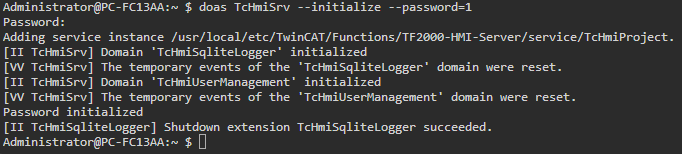
- The server has been initialized in the path /usr/local/etc/TwinCAT/Functions/TF2000-HMI-Server/service.
To display further settings, use the command
TcHmiSrv --helpFirewall
- 1. Open pf.conf to configure the firewall.
doas ee /etc/pf.conf- 2. Add the port 2020.
pass in quick proto tcp to port 2020 keep state- 3. Save and exit the editor.
- 4. Enter the command to reload the rules. The firewall must be activated for this.
- Port 2020 has been released for the HMI server.
doas pfctl -f /etc/pf.conf Further Information