Beckhoff RT Linux®
Initializing the TwinCAT HMI Server
- 1. Use the CLI directly on your device. Alternatively, you can also connect via SSH.
- 2. Log in as an administrator.
- 3. Initialize the server.
sudo TcHmiSrv --initialize --password=<Passwort>- 4. You can also pass the following additional parameters
--endpoint=http://127.0.0.1:2010 / Creates a local endpoint for http on port 2010
--name=MyProject / Creates the server instance with the corresponding name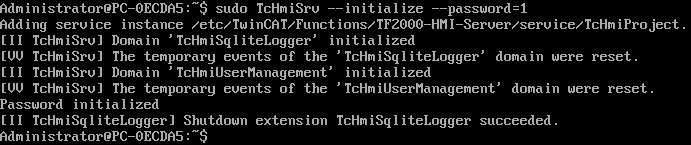
- The server has been initialized.
/etc/TwinCAT/Functions/TF2000-HMI-Server/service (Server < 14.5.73)
/var/lib/tchmisrv/service (Server >= 14.5.73)
To display further settings, use the command
TcHmiSrv --helpWhitelisting of further paths
- 1. Use the CLI directly on your device. Alternatively, you can also connect via SSH.
- 2. Log in as an administrator.
- 3. Open the configuration of the TcHmiSrv service.
sudo systemctl edit TcHmiSrv- 4. Enter the required paths in the configuration.
Example entry:
[Service]
ReadWritePaths=/path/to/your/extension_files
ExecPaths=/path/to/your/executables- 5. Save and close the file.
- The configuration was modified successfully.
Firewall
- 1. Create a configuration file in /etc/nftables.conf.d/, named 20-hmi.conf, for example.
sudo nano /etc/nftables.conf.d/20-hmi.conf- 2. Insert the following content and adjust the values to your network requirements:
table inet filter {
  chain input {
    # accept TcHmi
    tcp dport 2020 accept
  }
}- 3. Save and close the configuration file.
- 4. Load the new rule with the command
sudo systemctl reload nftables- 5. Check the settings and make sure that the configuration has been applied correctly.
- Port 2020 has been released for the HMI server.
sudo nft list rulesetNotes on ports
By default, the creation of ports below port 1024 is not allowed. In order to run the HMI server on a lower port, the service configuration must be adapted.
- 1. Use the CLI directly on your device. Alternatively, you can also connect via SSH.
- 2. Log in as an administrator.
- 3. Open the configuration of the TcHmiSrv service.
sudo systemctl edit TcHmiSrv- 4. Add the following entries so that the server can also run on lower ports.
[Service]
CapabilityBoundingSet=CAP_NET_BIND_SERVICE
AmbientCapabilities=CAP_NET_BIND_SERVICE- 5. Save and close the file.
- The configuration was modified successfully.
Further Information