AssertAbsEqual
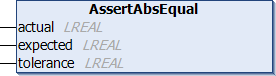
Similar to the AssertEqual method, this method is also used to verify whether the expected value of a test preparation step matches the actual result.
Similarly, a message is displayed here as well in the event of an error. However, the “AssertAbsEqual” method checks whether the expected value and the result are close enough to each other in terms of magnitude (absolute value). The amount must fall within the tolerance range, which you can also specify.
Syntax
METHOD PROTECTED AssertAbsEqual
VAR_INPUT
actual : LREAL;
expected : LREAL;
tolerance : LREAL;
message : STRING(255) := ''; // optional assert message
END_VAR Inputs
Name | Type | Description |
|---|---|---|
actual | LREAL | Value determined by the test performed |
expected | LREAL | Expected value for the test case. |
tolerance | LREAL | Permissible tolerance for this test case between the expected value and the calculated value. |
message | STRING(255) | Error message if the test fails. |
Example
AssertAbsEqual(actualValue, expectedValue, tolerance);