Settings Menu
The Settings menu contains all the settings that can be configured in the UI Test Client. To open the menu, follow these steps:
- 1. Right-click the menu icon (…).
- 2. Select Settings.
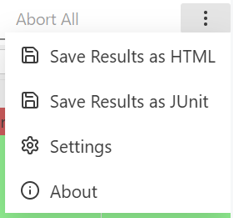
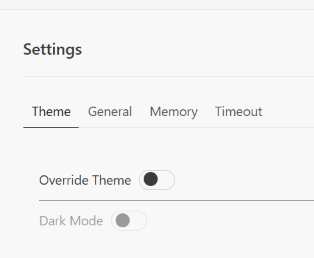
- The Settings menu opens.
Option | Description |
|---|---|
Theme settings | |
Override Theme | Allows the system theme settings to be overridden. Enables the Theme Mode setting. |
Theme Mode | Switches between light and dark themes. |
General options | |
Fast Mode | Toggles whether the runtime is reset once after each test case to minimize the impact of test cases on one another. |
Break On Error | Specifies whether the entire queue is aborted after a test case fails. |
Ignore Timeouts | Specifies whether timeouts are taken into account or not. |
Stop Iterating on first Failure | Specifies whether the test case should be terminated after the first error occurs during iterative execution. |
Requeue Run on Exception | Specifies whether the test execution is restarted if an exception occurs. |
Don’t Show Test Runs After Crash | Specifies whether the results are displayed after a crash. |
Auto-Detect ADS Port | Automatic detection of the ADS port in use. |
PLC ADS Port | Explicit setting of the ADS port used by the test application. |
Memory settings | |
Check Router Memory | Specifies whether real-time memory is monitored for each test case. Before and after the test case, the availability of real-time memory is queried and compared. |
Check Allocation Count | Specifies whether memory allocations should be counted. |
Automatic Restart if Memory is Low | Specifies whether the test execution will automatically restart if there is insufficient memory. |
Don’t ask to Restart if Memory is Low | Specifies that no requests should be made when storage is low. If the Automatic Restart if Memory is Low option is disabled, the system will not prompt you to restart manually when this option is enabled. |
Router Memory Limit (bytes) | Defines a limit on the amount of executable real-time memory that must not be exceeded during testing. |
Timeout & Build Settings | |
TwinCAT Startup Timeout (seconds) | Timeout for the TwinCAT restart |
TestControl Timeout (Seconds) | Timeout for the TestController in the PLC |
Increase Timeout by (milliseconds) | Extends the timeouts entered for the test cases by this amount. This applies to all test cases. |
TwinCAT Startup Retries | Number of attempts to restart TwinCAT |