Models
The Information Models window shows all currently loaded namespaces – both from all loaded type or instance nodesets. This window allows you to choose which namespace you want to edit when creating instances out of a data or object type. Only one namespace can be edited at a time. The namespace that is currently marked as editable is used when creating new instances.
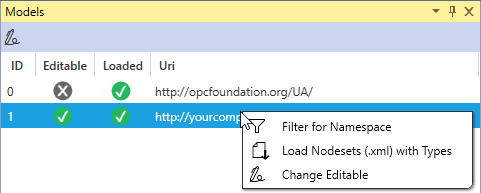
Nodesets can also be loaded via the context menu. A namespace can be selected as editable and filtered according to a namespace. A namespace can only be marked as editable if no other namespace is currently editable. If a namespace is to be marked as no more editable but the option is grayed out, unsaved changes must still be saved. If the editable nodeset is filtered, this is done in the Instance Explorer. If you filter for a non-editable nodeset, this is done in the Type Explorer. This feature uses the search in the Explorers, which you can customize manually.