Model download
Trained AI models, including integration artifacts, can be exported via the model download feature.
Choose software target
In the Software target field, you make a choice of the target software for generating the PLC code.
By default, the target software that was defined during model creation is used.
The target software can be changed again during the download. In this case, the PLC code is generated for the newly selected runtime environment. It is important to note that the latency estimate calculated during training is valid only for the target software that was originally configured.
Choose model format
Depending on the type of license used, different model formats are available.
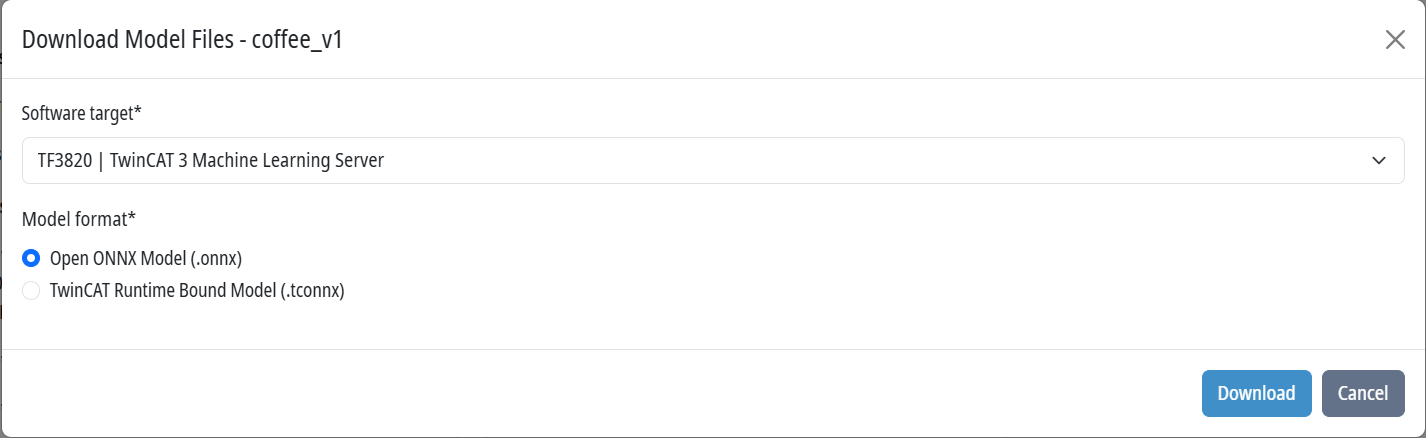
Open ONNX model (.onnx)
The model is exported as a standardized ONNX file.
ONNX is an open, framework-independent format and can be used in any compatible runtime environment or AI framework.
TwinCAT runtime bound model (.tconnx)
The model is exported as a TwinCAT-linked tcONNX model.
This format is intended exclusively for use within TwinCAT 3.
Contents of the download package
The download is a ZIP archive containing several files for integrating and documenting the AI model.
AI model
Contains the trained model in either ONNX or tcONNX format, depending on the selected export format.
model_card.json
- Describes the AI model that was created, including:
- data set splits used
- Input and output formats
- Class labels
- Timestamp
- Training and runtime information
- Latency estimates
PLCopen-XML
Includes complete PLC code for integration into TwinCAT 3.
The generated code includes:
- Image acquisition
- Image pre-processing
- AI inference
- Post-processing of the results
The file can be imported directly into TwinCAT 3.
Modelname.json
Depending on the selected software target, a specific JSON file is also generated, which is required by the inference software.
readme.md
Contains a detailed description of how to integrate the generated PLCopen XML into a TwinCAT 3 project. In addition, the necessary configuration steps and project-specific adjustments are described.