Basic concept
The following image shows the basic concept of TE3510 Analytics Vision. It shows the product embedded in a workflow that you can use as you wish. The other products are optionally linked and can be used.
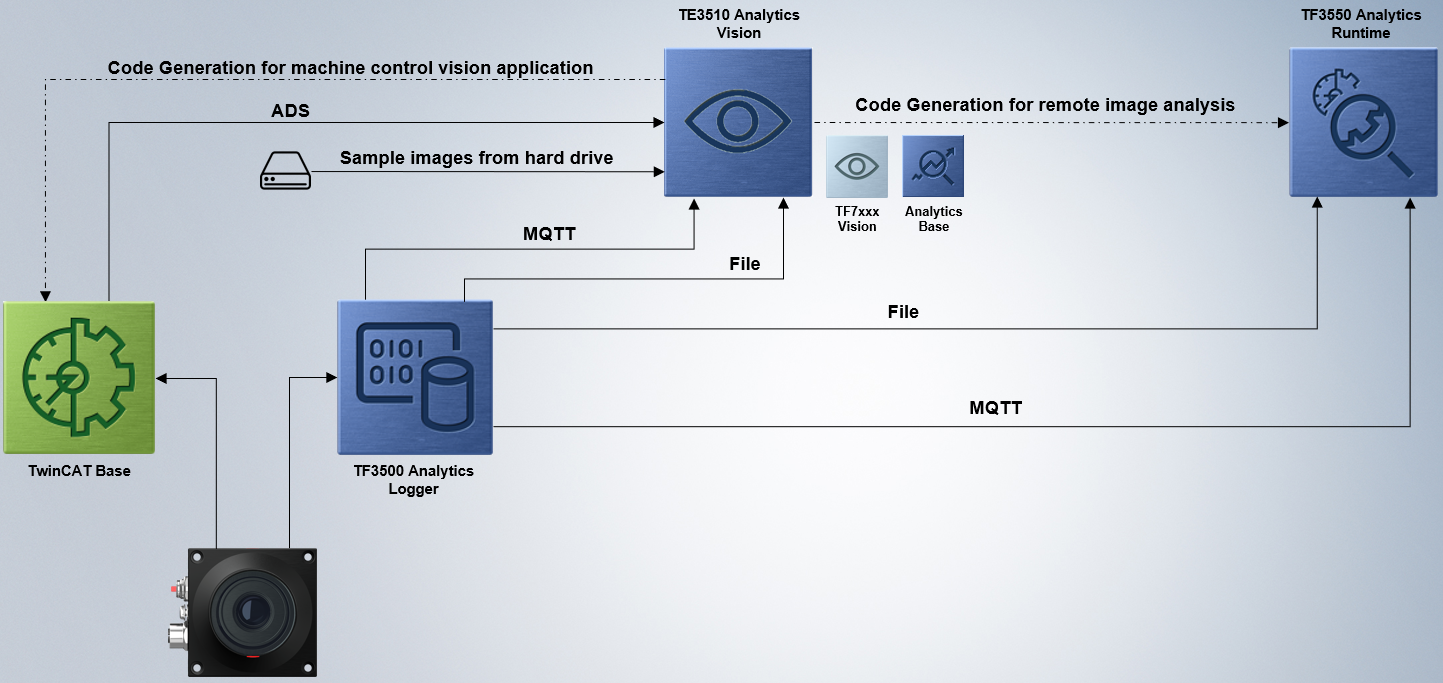
The TE3510 Analytics Vision is an engineering product of the TwinCAT Analytics product family. It has been specially developed for simple image data analysis.
Image data sources
You can import image data from different sources in Engineering.
- ADS - Images can be selected via PLC symbols or directly via VnTask in the Target Browser.
- Analytics Logger - Image data can be sent via so-called image streams via MQTT or written directly locally to an Analytics file.
- Hard disk - Image data stored on the hard disk can be transferred to the analysis software via a File Source. The following formats are supported: jpg, png, jpeg and tiff.
Algorithms
The image data can be interconnected with a variety of vision algorithms in engineering and evaluated step by step. The algorithms provided are all from the TwinCAT Vision products of the TF7xxx family. The algorithms cover a wide range from filtering, measurement technology and code detection to drawing, algebraic functions and OCR with machine learning.
Optimized engineering
Two essential tool windows make it easier to work with image data. One is the Module Watcher, which quickly visualizes the input and output image for an individual algorithm. And secondly, the Vision Gallery, in which you can view several images from different algorithms in parallel and edit them with tools.
Code generation
The result is automatic PLC and HMI code generation. TE3510 makes it possible to automatically generate PLC code based on the TwinCAT Vision libraries (TF7xxx) from the created block-based configuration. As can be seen in the picture above, two different approaches are offered.
- Classic analytics approach: The image data comes via Analytics Logger using MQTT via a message broker. If the Analytics Vision configuration is to be converted into PLC code, transparent PLC code is traditionally generated, which is deployed to a remote device in order to carry out continuous image data evaluation on this device. Optionally with your own HMI dashboard, which can be generated directly.
- Vision application: The prerequisite for the second case is a controller with a camera, which is configured in the TwinCAT System Manager. PLC code can be dispensed with initially, as this can be generated by TwinCAT Analytics Vision itself. You simply take the images from the VnTask and interconnect them in the Analytics configurator. Then deploy the configuration to the original source controller. In this case, the necessary FB_VN_CameraControl is generated automatically.
- Vision application 2: In another scenario, the task is not integrated via ADS, but a File Source with image data from the local hard disk. This automatically uses the FB_VN_FileSourceControl in the generated PLC code.
Extensions with other packages
All TE351x products can be combined with each other. For example, you can combine TE3510 Analytics Vision with TE3512 Analytics Condition Monitoring. Alternatively, purchase TE3500 Analytics Workbench. This product contains all algorithms and offers all functions.