Measure Edge Distance
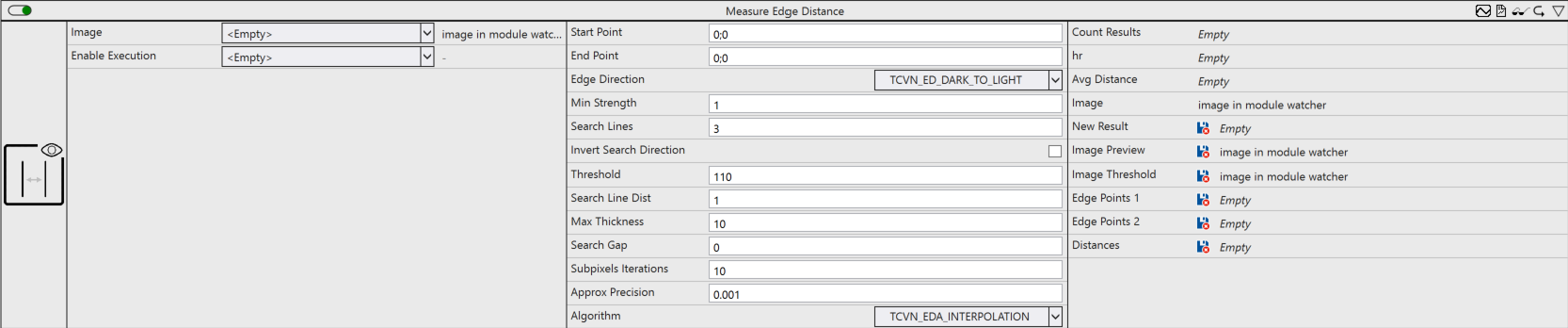
Exhibits the distance between two parallel edges.
Optionally, a Boolean signal can be selected for the Enable Execution input so that the algorithm is only active if the value of the selected signal is TRUE.
Configuration options
- Start Point: Position from which the search process is started in the direction of the End Point.
- End Point: Position at which the search process ends.
- Edge Direction: Definition of the edge direction to be searched for from Start Point to End Point.
- Min Strength: Definition of the minimum strength or intensity difference of the edge being searched for.
- Search Lines: Width of the search window, i.e. the number of search lines (1, 3, 5, 7, ...), centered around the line defined by Start Point and End Point.
- Invert Search Direction: If TRUE, the search starts from the midpoint between Start Point and End Point in both directions.
- Threshold: Threshold value for the binary image.
- Search Line Dist: (Optional) Distance between the search lines in pixels (> 0).
- Max Thickness: (Optional) Definition of the maximum thickness of the edge searched for. This means that Min Strength must be achieved within Max Thickness pixels.
- Search Gap: (Optional) Width of a gap (>= 0, centered between Start Point and End Point), which is ignored during the edge search and can reduce the execution time. The two edges you are looking for must be on different sides of the gap
- Algorithm: (Optional) Choice of edge detection algorithm.
- Subpixels Iterations: (Optional) Fixes the number of subpixels. For INTERPOLATION, 10 to 20 are usually sufficient. Alternatively, the value specifies the maximum number of iterations for optimizing the parameters; for APPROX_ERF and APPROX_GAUSSIAN, 50 to 100 is usually sufficient.
- Approx Precision: (Optional) Fixes the approximation precision for APPROX_ERF and APPROX_GAUSSIAN. 0.001 is usually sufficient; the value is not used for INTERPOLATION.
Output values
- Count Results: Is incremented when a new result is provided.
- hr: HRESULT error code that outputs the result of the processing.
- Avg Distance: Average distance between the two edges found.
- Image: Initial image of the algorithm.
- New Result: (Optional) TRUE if a new result is provided.
- Image Preview: (Optional) Image in which the set edges are drawn.
- Image Threshold: (Optional) Image to which the found threshold is applied.
- Edge Points 1: (Optional) Displays the points found on the edge near the start point.
- Edge Point 2: (Optional) Outputs the points found on the edge near the end point.
- Distances: (Optional) Displays the distances between the points found.