SrcData
Engineering
The data grid can be configured as follows to display a one-dimensional array:
- 1. Add a data grid to the interface.
- 2. Link the one-dimensional array with the attribute "SrcData" of the category "Data".
- 3. Change the column settings for the "SrcColumns" attribute in the "Data" category using the Column Definition Dialog.
- 4. Remove the default columns.
- 5. Add a new column of type "SimpleColumnDefinition".
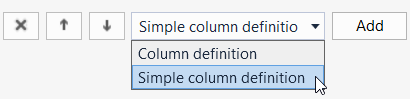
- 6. The column can then be configured.
- When working with an array of structures, proceed as follows:
- 7. Add a data grid to the interface.
- 8. Link the desired array with the attribute "SrcData" of the category "Data".
- 9. Change the column settings for the "SrcColumns" attribute in the "Data" category using the Column Definition Dialog.
- 10. Define the desired number of columns of type "ColumnDefinitnion" and their order.
- 11. Adjust the settings for each column, whereby the "Name" attribute must correspond to the name of the structure element of the array to be displayed in this column.
The definition of the "Name" attribute is case-sensitive.
For nested structures, you can access the sub-elements of the structure using "::" as a separator, e.g. "myStruct::myStructMember". - In order for changes in the data grid to be written back to the controller, the following steps must be performed:
- 12. Go to the Events page of the Properties window.
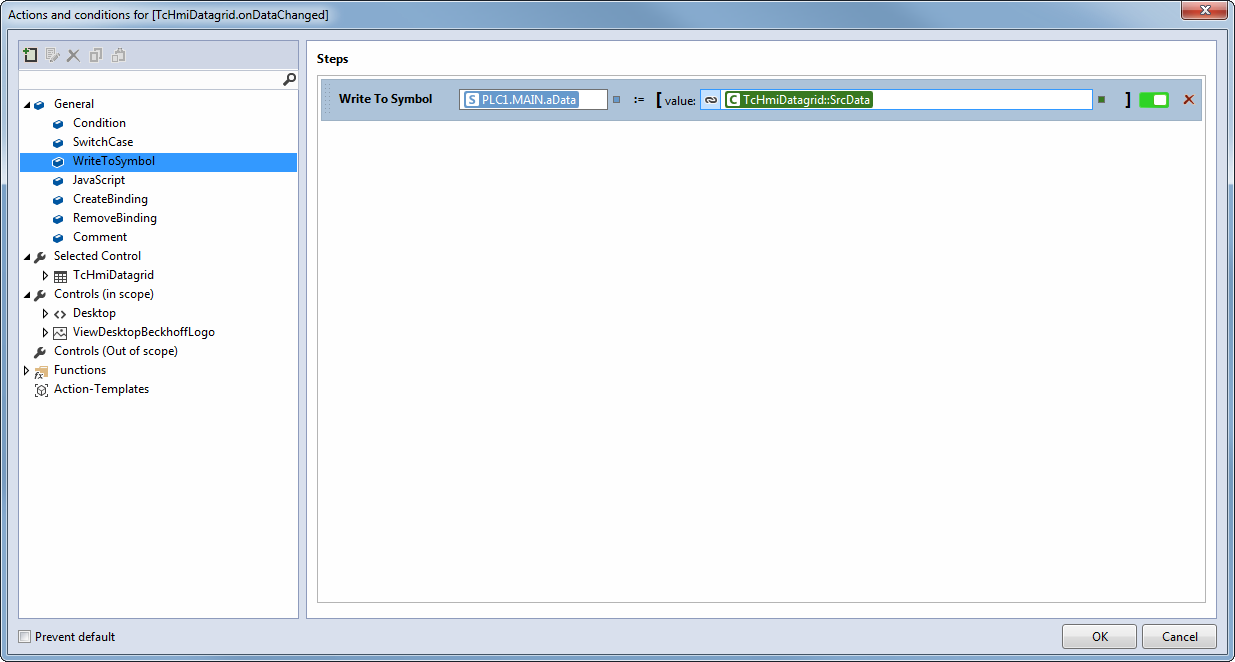
- 13. Configure the ".onDataChanged" event.
- 14. Add a "WriteToSymbol" action.
- 15. Link the first parameter to your array.
- 16. Link the second parameter with the attribute "TcHmiDatagrid::SrcData".
Schema: tchmi:general#/definitions/Array
Attribute getter
public getSrcData(): any[] | undefined;Parameter
Name | Type | Description |
|---|---|---|
- | - | - |
Return value
Type | Description |
|---|---|
The current value of the attribute. |
Attribute setter
public setSrcData(valueNew: any[] | null): void;Parameter
Name | Type | Description |
|---|---|---|
valueNew | The new value of the attribute. If null is passed, the internal default value is used. |
Return value
Type | Description |
|---|---|
void | No return value. |
 | Available from 1.8 |