An HMI project can also be transferred to the target system via a data exchange without a direct network connection.
1. Install the TwinCAT HMI server (install TF2000) on the target system and on your engineering system.
2. Perform a project publish on the TF2000 TwinCAT HMI server on your engineering system.
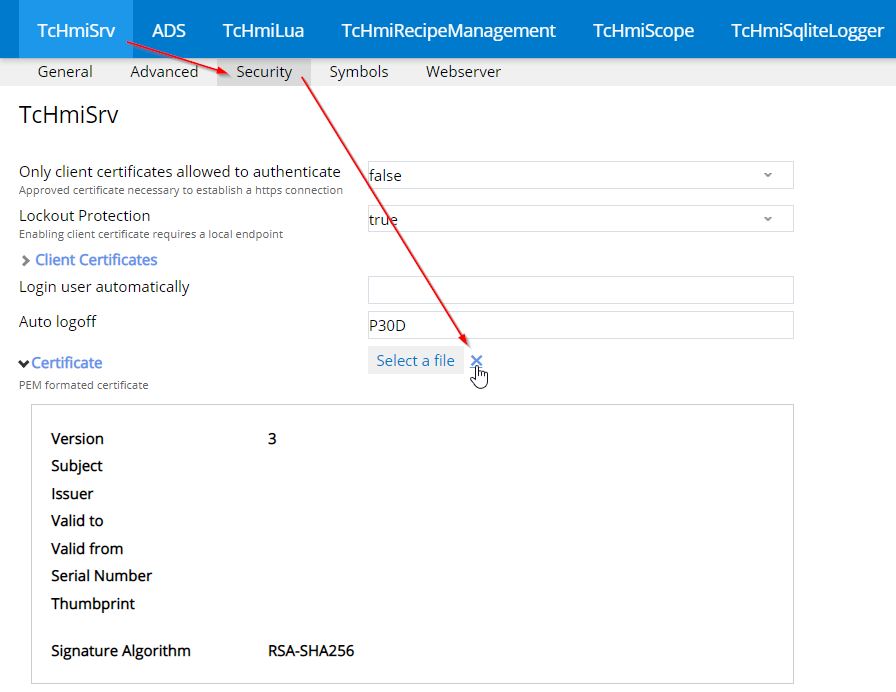
3. Open the server configuration page. (Default: https://127.0.0.1:2020)
4. Go to the TcHmiSrv / Security tab.
5. Delete the certificate and self-signed root certificate (small red x)
Deleting the two certificates is necessary so that they are recreated on the target system with the appropriate settings.
6. Stop the human-machine interface on your local system
net stop TcHmiSrv
7. Copy the entire contents of the folder: Version 1.10: C:\ProgramData\Beckhoff\TF2000 TwinCAT 3 HMI server Version 1.12 / 1.14: C:\ProgramData\Beckhoff\TF2000 TwinCAT 3 HMI server\service\{TcHmiInstanceName}
8. Transfer the folder contents to a medium for data exchange (e.g. USB stick).
9. Stop the human-machine interface on the target system.
10. Add the folder content to the following folder on the target system: Version 1.10: C:\ProgramData\Beckhoff\TF2000 TwinCAT 3 HMI server Version 1.12 / 1.14: C:\ProgramData\Beckhoff\TF2000 TwinCAT 3 HMI server\service\{TcHmiInstanceName}
11. Start the TwinCAT HMI server on the target system.
The previously deleted certificates have been recreated and the project can now be used.