Claims
Reading out the claims
- 1. Open the configuration page of the OAuth extension in the HMI project.
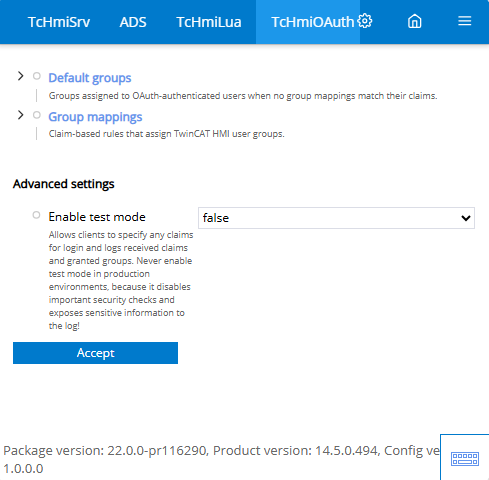
- 2. Activate the "Advanced settings" of the Config Page.
- Click on the three dashes at the top right.
- Click on "Show advanced settings". - 3. Activate the test mode.
- 4. Open the server log page.
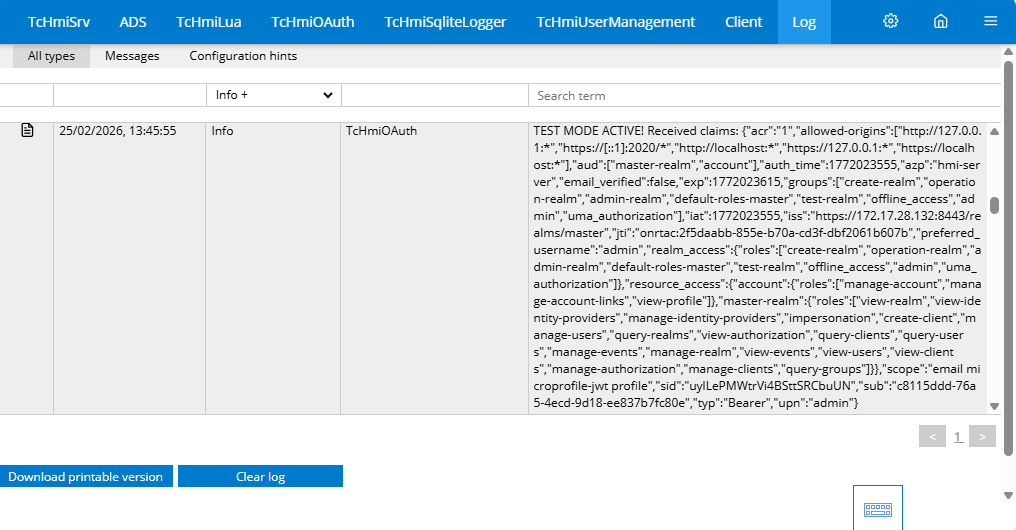
- Each time you log in to the OAuth extension, the claims received are now displayed here in JSON format.
- 5. Copy the JSON string into an editor to format it.
- You can now check the claims data.
Sample JSON:
{
    "acr": "0",
    "allowed-origins": [
        "http://127.0.0.1:*",
        "https://[::1]:2020/*",
        "http://localhost:*",
        "https://127.0.0.1:*",
        "https://localhost:*"
    ],
    "aud": [
        "master-realm",
        "account"
    ],
    "auth_time": 1772021979,
    "azp": "hmi-server",
    "email_verified": false,
    "exp": 1772022092,
    "groups": [
        "create-realm",
        "operation-realm",
        "admin-realm",
        "default-roles-master",
        "test-realm",
        "offline_access",
        "admin",
        "uma_authorization"
    ],
    "iat": 1772022032,
    "iss": "",
    "jti": "",
    "preferred_username": "admin",
    "realm_access": {},
    "resource_access": {},
    "scope": "email microprofile-jwt profile",
    "sid": "",
    "sub": "",
    "typ": "Bearer",
    "upn": "admin"
}
Syntax
Simple key:
Easy access to an entry within the claims.
email                             → claims["email"]
sub                               → claims["sub"]
email_verified                    → claims["email_verified"]
Separator:
The individual levels are separated with double colons "::".
realm_access::roles               → claims["realm_access"]["roles"]
resource_access::account          → claims["resource_access"]["account"]
user::profile::name               → claims["user"]["profile"]["name"]
Array:
An index can be used to check a specific index.
groups[0]                         → claims["groups"][0]  (first element)
roles[2]                          → claims["roles"][2]   (third element)
realm_access::roles[0]            → claims["realm_access"]["roles"][0]
The entire array is checked with an asterisk *.
groups[*]                         → any element in claims["groups"]
realm_access::roles[*]            → any element in claims["realm_access"]["roles"]