Configuration
The basic settings for the server extension are specified in the General tab.
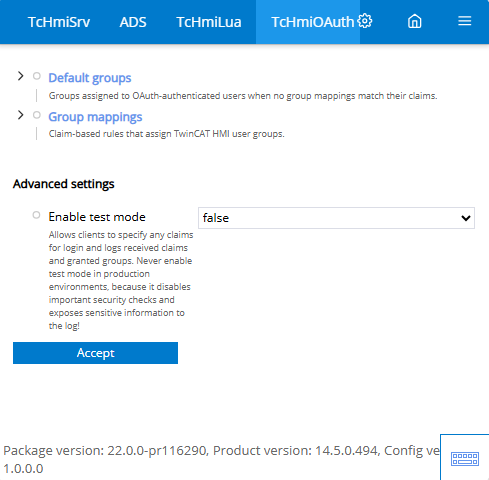
Default groups
- Specifies which user groups are added as default to each user from the OAuth.
- Converts claim data to user groups. If a user on the OAuth server contains certain claims, these can be evaluated and assigned to a user group from the TwinCAT HMI accordingly.
Activate test mode (Advanced settings)
- In test mode, the claims received during login are written to the TcHmi log. This can be used to check the claims. This option should not be set on a productive system.
Validation OAuth 2.0 in the server (TcHmiSrv > Security > OAuth 2.0 authorization configurations)
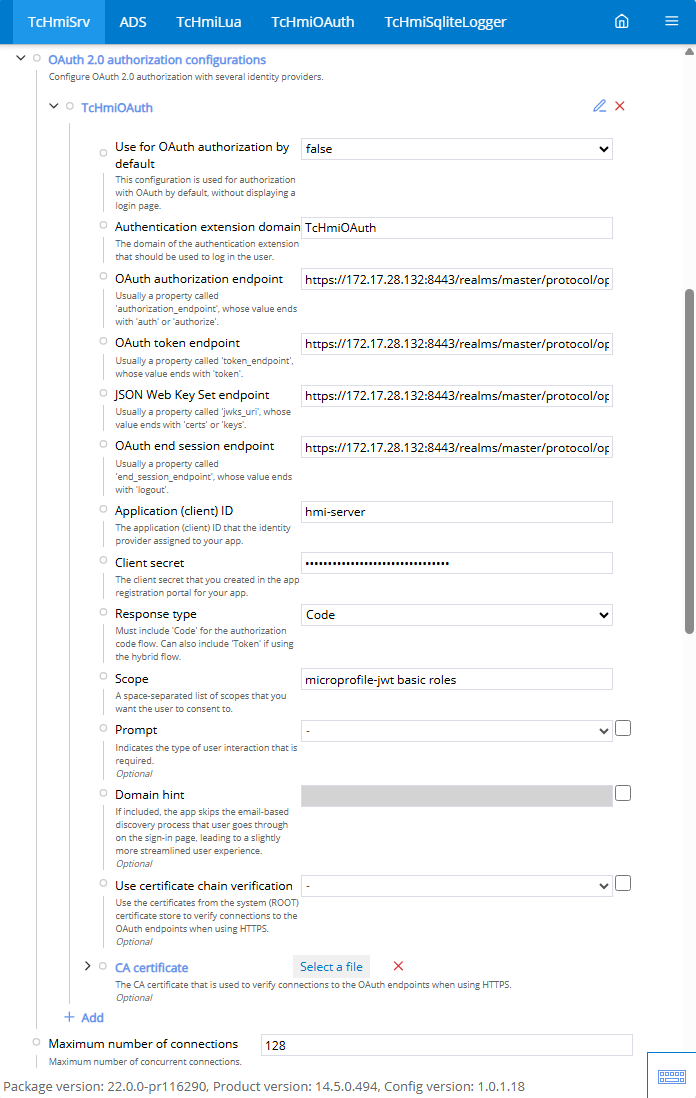
Use by default for OAuth authorization
- Use the login page of the OAuth server instead of the TwinCAT HMI login page.
Authentication extension domain
- Links the set OAuth certification with a server extension. The server extension can then perform functions such as automatic mapping of users.
OAuth authorization endpoint
- Specifies the authorization endpoint of the OAuth server.
OAuth Token Endpoint
- Specifies the token endpoint of the OAuth server.
JSON Web Key Set Endpoint
- Specifies the web key set endpoint of the OAuth server.
OAuth Endpoint to end the session
- Specifies the end session endpoint of the OAuth server.
Application or client ID
- Client configuration of the OAuth server.
Secret client key
- Client key of the OAuth server.
Response type
- Specifies the type in which the response is received.
Scope
- Describes the scope being used.
"microprofile-jwt" is required for the TwinCAT HMI with OAuth 2.0.
Domain note
- Skips the check process via the e-mail address when activated.
Request
- Specifies the type of request.
Domain note
- Specifies the name of the domain being used. This information skips the e-mail-based determination.
Use verification of the certificate chain
- Activation uses the standard certificate store.
CA certificate
- If the standard certificate store is not to be used, the certificate can be stored here directly on the HMI server.
Further Information