Configuration
General
The basic settings for the server extension are specified in the General tab.
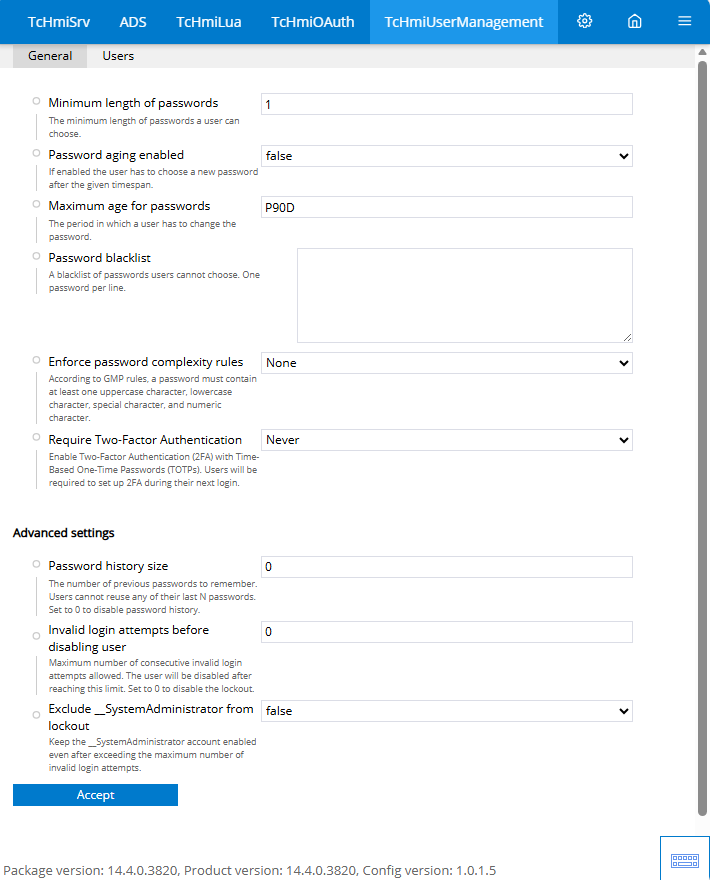
Minimum password length
- Minimum length that a new password must have.
Password aging active
- Activates the aging of a password.
Maximum password age
- Time until a new password must be entered when password aging is active.
Password blacklist
- List of disallowed passwords.
Rules for password complexity
- Sets complexity rules for passwords. (GMP = upper case letters, lower case letters, special characters and numbers included)
Two-factor authentication required
- Activates two-factor authentication. An app such as Google Authenticator or Microsoft Authenticator must be used for authentication.
Password history size (advanced settings)
- Blocks the use of previously used passwords. Depending on the number, the last n passwords are locked as the new password. (Default = 0 "disabled")
Failed attempts until deactivation (advanced settings)
- Blocks users after n failed login attempts. (Default = 0 "disabled")
Exclude __SystemAdministrator from blocking (advanced settings)
- Allows the "__SystemAdministrator" to be blocked if n login attempts fail.
User
Users can be created, edited or deleted in the User tab.
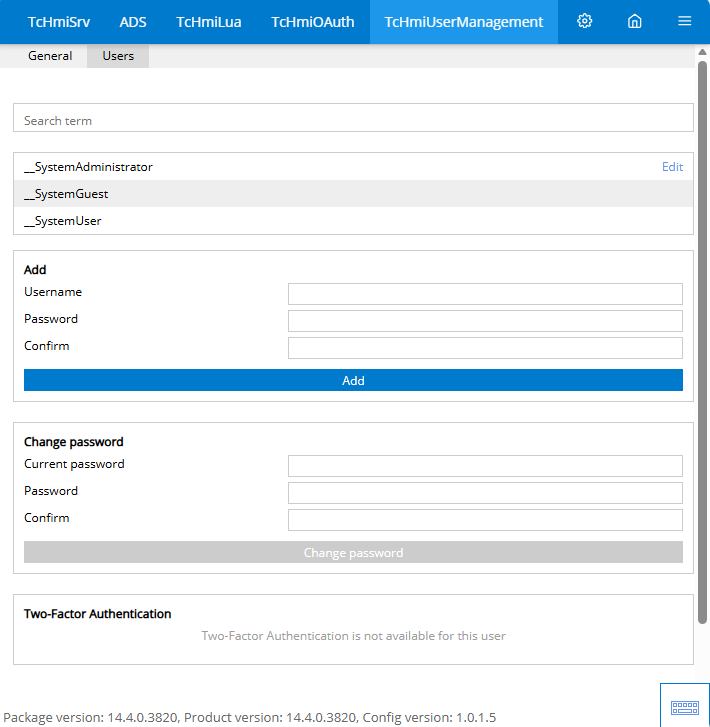
Add
- Add a new user. The user name and password must be entered for this.
Change password
- Change the password of the user currently logged in. To do this, the current password and the new password must be entered.
Two-factor authentication
- If two-factor authentication is activated, a QR code for setting up the authentication app is displayed here. After successful setup, two-factor authentication can be reset.
Further Information