Concept
Each HMI Framework project template can be used to create HMI content packages. To support the graphical editors, an instance of the HMI Engineering Server is started when the HMI Framework project is launched.
To ensure that content from HMI content packages can be clearly addressed in HMI projects, the control IDs and symbols are prefixed with the package ID.
Example: Control Ids:

Example: Syntax for internal symbols:
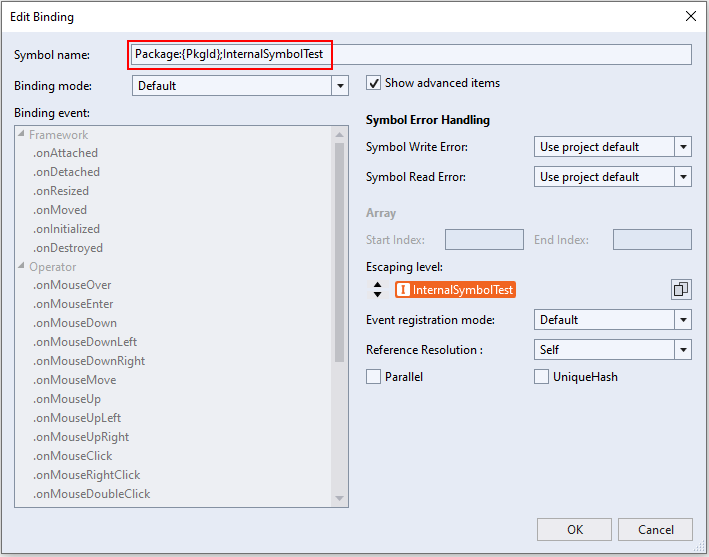
The Package ID serves as a placeholder for the package name that is stored in the .nuspec file of the content package. The project name of the framework project is used by default. The framework resolves the placeholder at runtime.
The new symbol type Package Symbol is introduced with the HMI content packages. This makes it possible to link symbols from a HMI project with the content from an HMI content package. For example, to be able to display a PLC symbol on a content. The package symbols can be configured via the TwinCAT HMI Configuration Window in the same way as internal symbols.
TwinCAT HMI Configuration: Package Symbols:
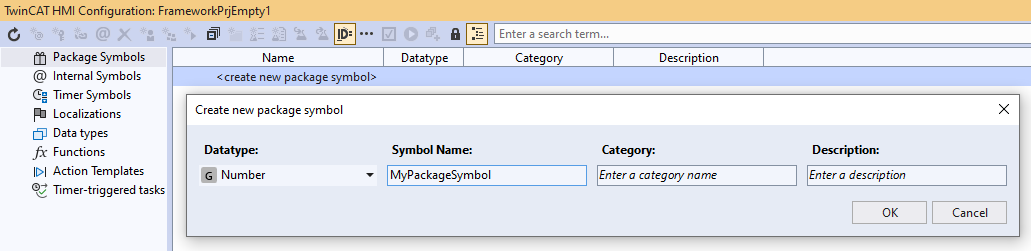
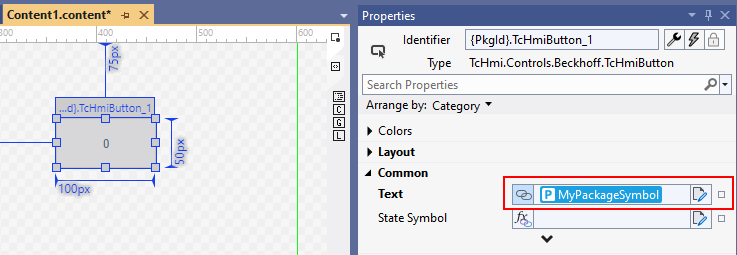
Package symbols can be used as data binding within the HMI framework project.
Data binding of a control property with a package symbol:
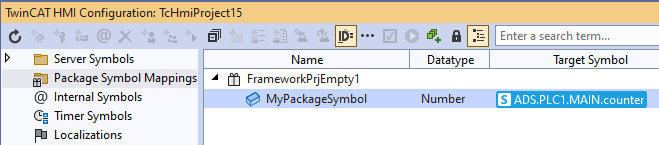
Once the HMI content package has been integrated into an HMI project, the package symbol mapping can be configured via the TwinCAT HMI Configuration Window so that a symbol from the HMI project is linked to the package symbol from the HMI content package.
Mapping a package symbol to a symbol from the HMI project: