Version 1.14
Installation Setup
No setup is available for the TE2000 in version 1.14. The TE2000 must be installed via the TwinCAT Package Manager.
Installation Tcpkg
PowerShell:
- 1. Open PowerShell.
- 2. Enter the command:
tcpkg install TE2000.HMIEngineering.XAE
- Engineering TE2000 has been successfully installed and is available in TcXaeShell or Visual Studio.
TwinCAT Package Manager
- 1. Open the TwinCAT Package Manager. Check under the settings whether the integration in Visual Studio is enabled.
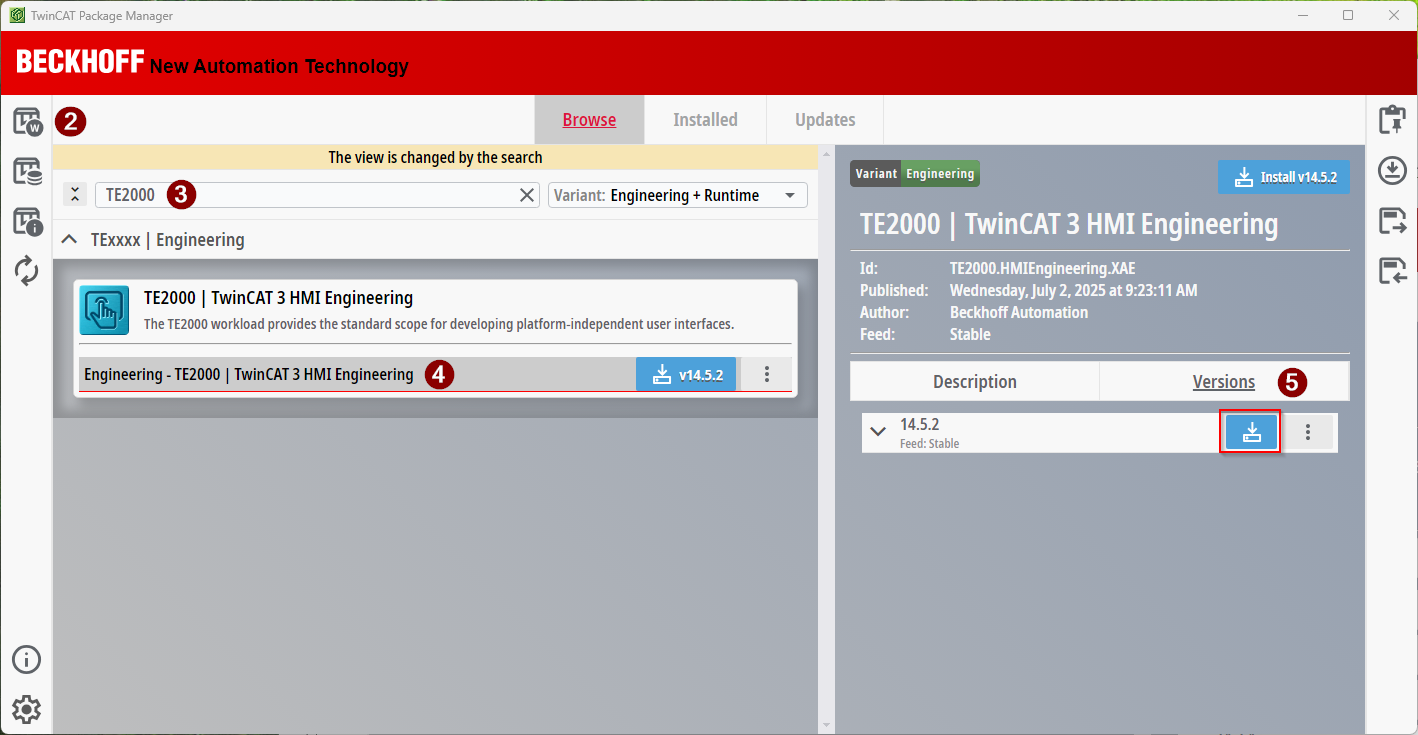
- 2. Select the Workloads area.
- 3. Search for TE2000.
- The workload of the TE2000 appears.
- 4. Select the TE2000 to see all available versions.
- 5. Select the required version.
- The version has been placed in the top-right of the template for installation.
- 6. Click on the template at the top right.
- A pop-up window opens.
- 7. Click Apply changes.
- Engineering TE2000 has been successfully installed and is available in TcXaeShell or Visual Studio.
 | Since version 1.14.x, no HMI server is installed in the background when installing the Engineering (TE2000). The HMI server is integrated directly into the TwinCAT HMI project using a NuGet package. This offers the advantage that there is no fixed binding between the engineering and the version of the server. This allows old projects to be opened in a new engineering without having to migrate to a new version. To update the server version in a project, the NuGet package Beckhoff.TwinCAT.HMI.Server.Engineering must be changed to the desired version. |