Configuration
General
The basic settings for the server extension are specified in the General tab.
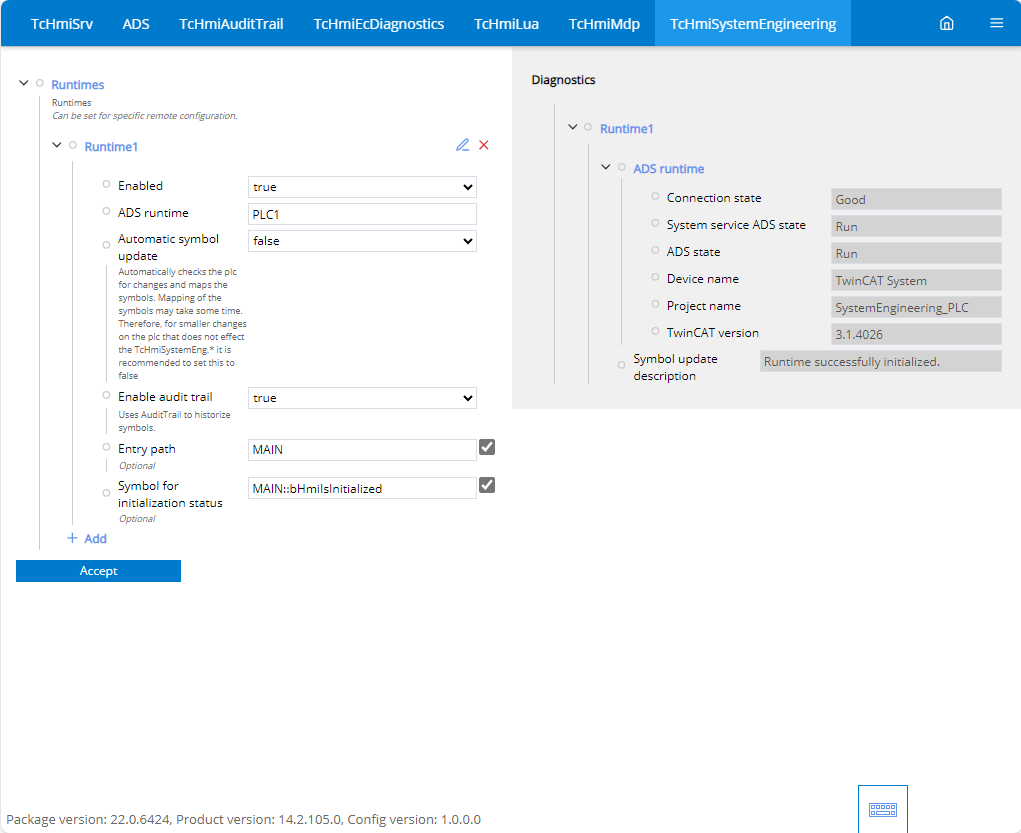
Runtimes
Several runtimes can be created under Runtimes. A runtime is the connection to a PLC.
Enabled
- Enables access to the runtime.
ADS runtime
- Selection of runtime from the ADS extension. All available runtimes from the ADS extension are made available here in the dropdown.
Automatic symbol update
- Automatically checks the PLC for changes and updates the symbols. Mapping the symbols can take some time. It is therefore recommended to set this to FALSE for small changes to the PLC that do not affect “TcHmiSystemEng.*”.
Enable audit trail
- Uses audit trail for the historization of symbols.
Entry path
- Set the level from which the PLC is to be browsed. The smaller the structure to be browsed, the less time is required.
Symbol for initialization status
- Configure an initialization bit to see whether the initial values have been written to the PLC. If the bit in the PLC is set to FALSE, this triggers the persisted data to be written to the PLC again.
 | The values persisted in the extension are initially written to the PLC when the HMI server is started. |
| If several SystemEngineering Extensions are looking at a system at the same time, this can lead to them updating the data at different times. Prevent this by deactivating the corresponding runtime in the SystemEngineering extension as soon as another extension has access to the same PLC. |