Adding symbols
Use Symbols to add new entries to the Audit Trail. Here it is only possible to log write commands from the client to the server. If there is a write command from a symbol added to the Audit Trail, the value change is logged in the Audit Trail together with the user and timestamp.
Adding a symbol in Visual Studio / TcXaeShell
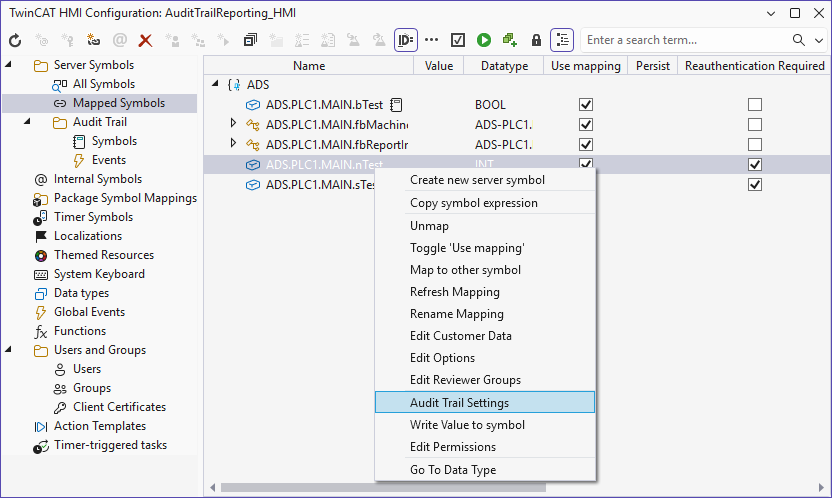
- 1. Open the TwinCAT HMI Configuration window.
- 2. Go to the Server Symbols / Mapped Symbols tab.
- 3. Select the symbols to be added to the Audit Trail.
- 4. Add these to the Audit Trail configuration by right-clicking on Audit Trail Settings.
- A pop-up opens for further settings.
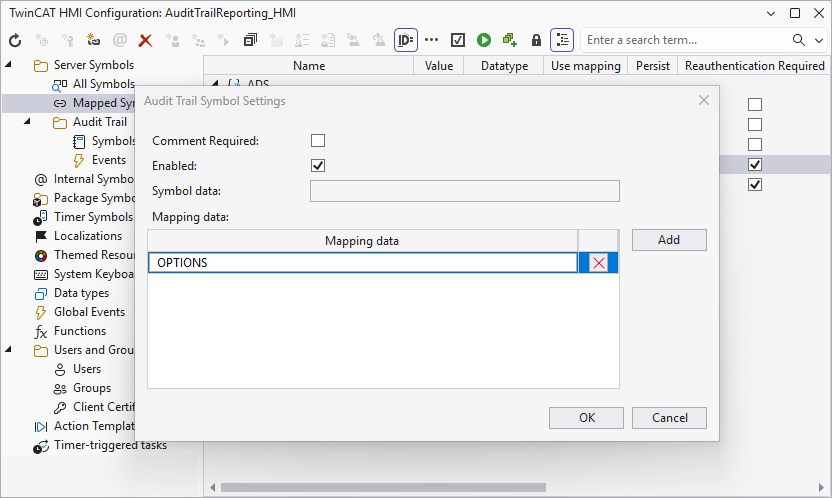
- 5. Set the settings according to your requirements.
Comment Required: Specify whether a comment must be entered when the value is changed.
Enabled: Activate the recording of the symbol in the AuditTrail.
Symbol data: Specify fixed values that should also be saved in the AuditTrail.
Mappingdata: Specify which values from the symbol mapping should also be saved in the audit trail. - 6. Confirm your settings with OK.
- The symbols you have configured are now automatically logged in the Audit Trail during a write operation. If the comment function has been activated, this is also entered.
Adding a symbol via the server configuration page
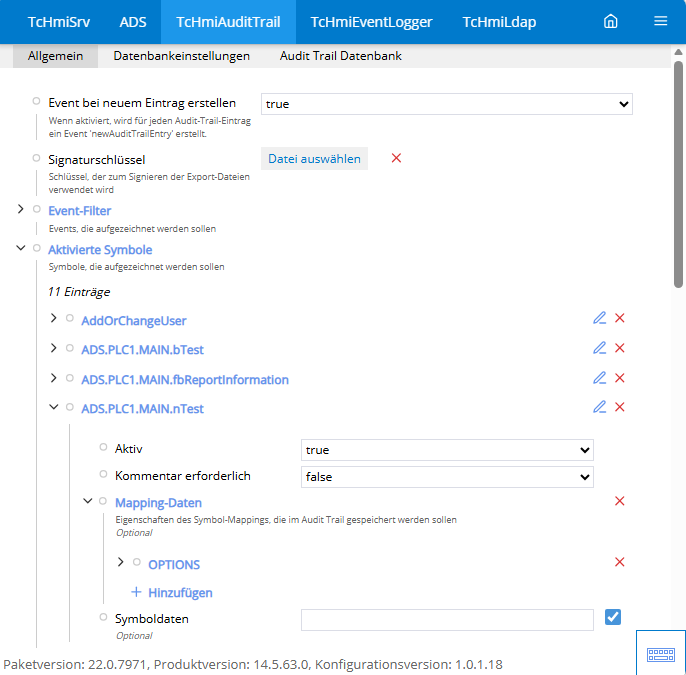
- 1. Open the server configuration page.
- 2. Go to the TcHmiAuditTrail > General tab.
- 3. Go to Activated symbols.
- All currently configured symbols are displayed here.
- 4. Click on Add to create a new symbol.
- A pop-up opens for further settings.
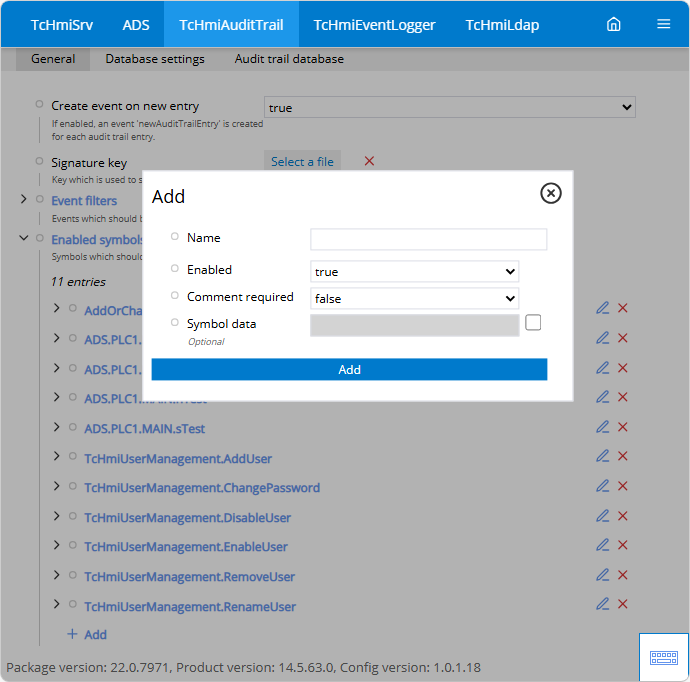
- 5. Set the settings according to your requirements.
Name: Enter the name of the symbol.
Active: Activate the recording of the symbol in the audit trail.
Comment required: Specify whether a comment must be entered when the value is changed.
Symbol data: Specify fixed values that are to be saved in the audit trail. - 6. Confirm your settings with Add.
- The symbols you have configured are now automatically logged in the Audit Trail during a write operation.
Adding mapping data
- 1. Choose the newly created symbol.
- 2. Under Mapping data, you can now specify which other values from the symbol mapping should also be saved in the audit trail.
- The new value you have added is now saved with the additional mapping data.
Mapping Data Attributes:
Attribute | Description |
|---|---|
ACCESS | Specifies the default rights of the symbol. |
CUSTOMERDATA | Customer data that is also sent to the server during a write process. |
DOMAIN | Specifies the domain of the symbol. |
DYNAMIC | Indicates whether the symbol is static or dynamic. Static symbols cannot be deleted. |
EXTENSION_DATA_DOMAINS | Provides additional information during the write process. |
MAPPING | Specifies the destination of the symbol. |
OPTIONS | Indicates additional information about the symbol. |
REAUTHENTICATION_REQUIRED | Indicates whether re-authentication is requested. |
REVIEWER_GROUPS | Specifies which user groups are authorized to release a value change. |
SCHEMA | Specifies the scheme of the symbol. |
USEMAPPING | Indicates whether the symbol is linked to the mapping. |