'Build' tab
You can configure the build settings under the Build tab.
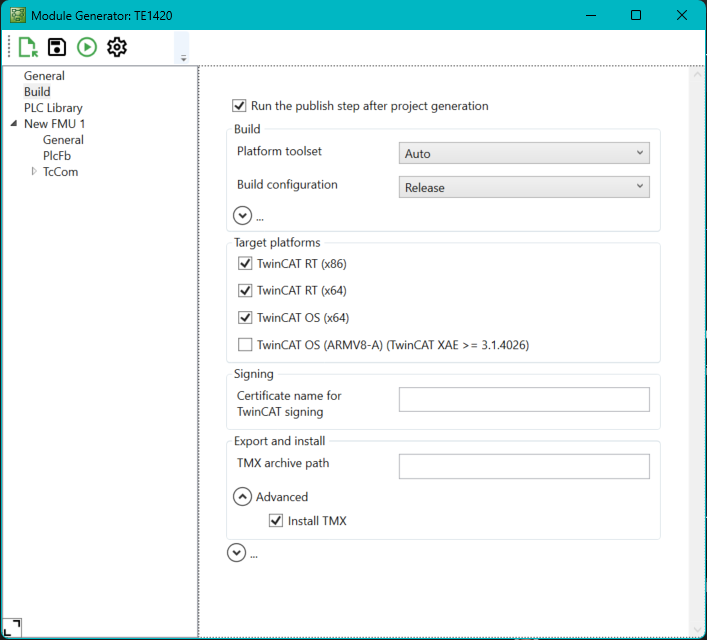
Setting | Meaning | Command line parameters |
|---|---|---|
Run the publish step after project generation | Selection whether only the code should be generated or the tmx driver should also be built for the selected platforms. | --Project.Publish |
Platform Toolset | Selection of the Visual Studio toolset used for building. | --Project.PublishPlatformtoolset Default: Auto |
Build configuration | Selection of the build configuration (debug/release). | --Project.PublishConfiguration Default: "Release" |
TwinCAT RT(x86) | Creating a tmx driver for the TwinCAT RT(x86) platform. | --Project.PublishTcRTx86 Default: "true" |
TwinCAT RT(x64) | Creating a tmx driver for the TwinCAT RT(x64) platform. | --Project.PublishTcRTx64 Default: "true" |
TwinCAT OS(x64) | Creating a tmx driver for the TwinCAT OS(x64) platform. | --Project.PublishTcOSx64 Default: "true" |
TwinCAT OS(ARMV8-A) | Creating a tmx driver for the TwinCAT OS(ARMV8-A) platform. | --Project.PublishTcOSARMv8A Default: "false" |
Certificate name for TwinCAT signing | TwinCAT certificate name to be used for signing the generated tmx driver. | --Project.SignTwinCatCertName Default: "" |
tmx Archive | Name of a tmx archive that can be used for sharing the tmx files. | --Project.TmxArchive Default: "" |
There are also the following extended parameters, which are collapsed by default and do not normally need to be adjusted.
Setting | Meaning |
|---|---|
Specify C++ language standard version | Selection of the C++ standard used |
Code generation and build verbosity | The level of detail with which code generation and build messages are logged in the output window. |
Always rebuild all source files on publish | Select this option to ensure that all source code files are always rebuilt. |
Build parallel to publish | When multiple build platforms are selected, the compilation processes are independent of each other and executed sequentially. Activating this option causes all build processes to be executed in parallel on your engineering system. Parallelization is performed by the operating system. To avoid unnecessary waiting times, only create binaries for the platforms you use. |
Install TMX | Installs the generated TMX into the repository. |
Deployment project | Absolute path to the TwinCAT 3 project (*.tsproj) in which the module is to be automatically updated. |
Activate and restart deployment project | Activate and restart the project on the target system stored in the project. |