'General' tab
In the General tab, you can adjust general settings. By default, these are provided with placeholders and are assigned the default values. Changed settings are persisted in an xml file and are retained for new projects. These can be reset using the Restore defaults context menu option.
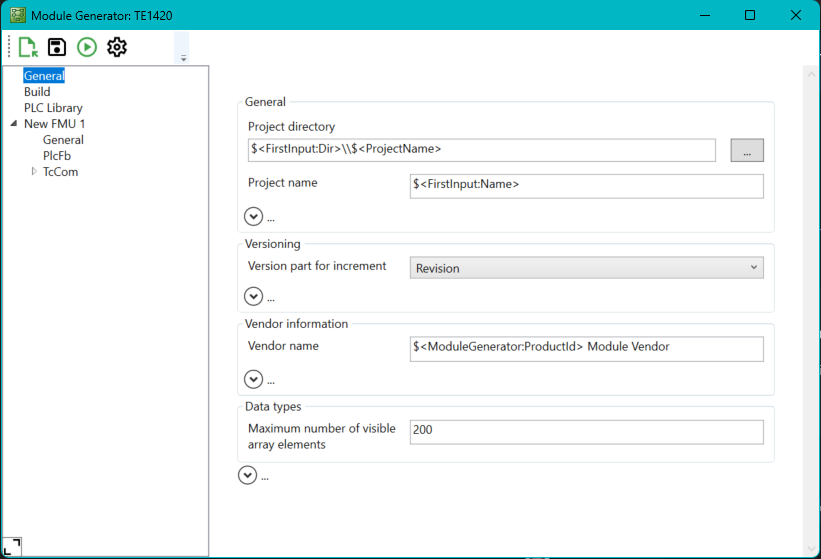
Setting | Meaning | Command line parameters |
|---|---|---|
Project directory | Project directory under which the TcCOM module is to be generated. | --Project.ProjectDir |
Project Name | Name of the project | --Project.ProjectName |
Version part for increment | Part of the version number to be incremented each time a new one is created. | --Project.IncrementVersion Default: Revision |
Vendor Name | Vendor name, the name under which the generated TcCOM module is sorted in the module selection dialog. | --Project.VendorName |
Maximum number of visible array elements | Maximum number of visible array elements | --Project.MaxVisibleArrayElements Default: 200 |
There are also the following extended parameters, which are collapsed by default and do not normally need to be adjusted. In most cases, templates are already stored here, which automatically adjust the parameter values.
Setting | Meaning |
|---|---|
Pack output path | Path where the generated C++ project is stored. |
Version source file | Version number of the source code file |
Executable file version | Version number of the generated module or library |
Executable product version | Product version of the generated module or library |
Class factory name | Name of the TcCOM Classfactory or driver |
Product name | Product name |
Copyright notice | Copyright notice |
Executable description | Description text of the module |
Additional options | Options to overwrite internal code generator parameters |
ID of OEM | ID of OEM, is required when using OEM licenses. |
IDs of OEM licenses | List of OEM licenses that are queried when the module is started. |