Creating versioned drivers
Each object created from MATLAB® contains version information. Accordingly, you can build several versions of a MATLAB® function and instantiate the created modules version-selectively in TwinCAT. The version number consists of four digits, such as 1.0.3.2 or 2.12.123.14. Each digit can be incremented separately according to the following format: <Major>.<Minor>.<Build>.<Revision>
Define versioning in MATLAB®
Versioning is configured using the project parameters in the export configuration. The Target for MATLAB® allows for both automatic version number incrementation and the specification of a fixed version number.
 | Available example in MATLAB® Run the following command in the MATLAB® command line to open the example: |
Automatic version increments
The basic version on which a version update is to be created is specified via Project.VersionSrc. In the standard case $<LatestTMFile> is specified there. This searches for the last available version of the model on the local engineering PC and then uses this as the basis for the version increment.
Each digit of the version number can be incremented separately according to the scheme: <Major>.<Minor>.<Build>.<Revision>
You can use Project.IncrementVersion to specify which digit should be incremented:
exportCfg.Project.IncrementVersion = 'Revision';The following options are available here: None, Revision, Build, Minor, and Major . If “None” is selected, no version update takes place and the last version on the engineering PC is overwritten.
For example, if the last version of a model named “MyModelXY” on the engineering PC is found to be 1.2.12.4 and the increment is set to Revision, a version 1.2.12.5 is created.
Default of a fixed version number
A fixed version number can be specified using Project.DrvFileVersion:
exportCfg.Project.DrvFileVersion = '1.2.12.5';Presetting of a version number via an external file
You can also use an external file to specify a version. For example, this is a common method when using build agents at Continuous Integration.
To configure this in MATLAB®, disable automatic version number incrementing
exportCfg.Project.IncrementVersion = 'None';and enter the full path to your version file at Project.VersionSrc.
exportCfg.Project.VersionSrc = fullfile(pwd, 'version.xml');Structure of external file:
<?xml version="1.0" encoding="UTF-8"?>
<configuration>
  <appSettings>
    <add key="major" value="1" />
    <add key="minor" value="3" />
    <add key="build" value="1301" />
    <add key="revision" value="267" />
  </appSettings>
</configuration>
Use versioned models in TwinCAT XAE
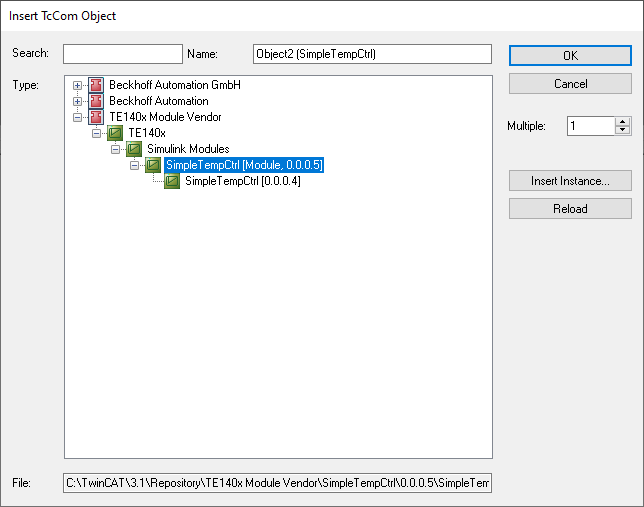
All models available in the Engineering Repository can also be instantiated in any available version. To do this, navigate through the tree as usual to find the TcCOM of your choice. In the last hierarchical level, you can now also select the version of the TcCOM.
As an example, two versions (0.0.0.4 and 0.0.0.5) of SimpleTempCtrl are available here: