Array Handling
The Table Chart supports the display of array variables with a dedicated hierarchy structure.
Array Display
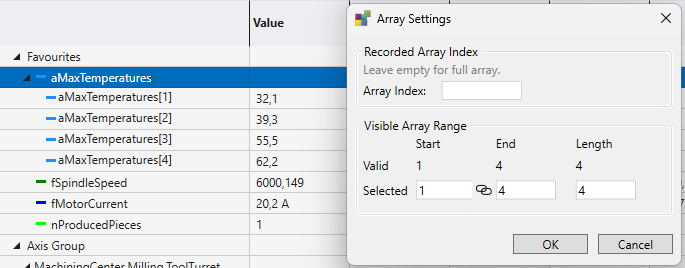
At the top level, an array is represented as a single row that corresponds to the entire array. When the array is collapsed, its values are displayed inline and separated by a pipe character (|), allowing a compact overview of the data. When the array is expanded, each visible array index is shown as an individual row, making it possible to inspect elements in detail.

Performance Settings
To ensure good performance and maintain readability when working with large arrays, not all indices are displayed by default. You can define a Start Index to specify the first visible array element and a Length to control how many elements are shown, with a maximum of 32 visible indices at a time.
The user can choose whether to record the full array and receive updates for all indices from the Scope Server, or to record only a single array index. When only one index is recorded, the acquisition behaves like a regular non-array channel.
This behavior is also handled reliably when creating and loading snapshots (LINK). Both full-array and single-index acquisitions are correctly preserved, ensuring consistent recording and playback across snapshot workflows.
These settings can be configured on a per-channel basis through the properties panel or in a specific popup through the channel’s context menu: