Table-Channel-Eigenschaften
Here you can configure all settings assigned to channels in the Table Chart.
Common
|
Comment |
A free comment can be entered here. If applicable, the comment from the target browser symbol is adopted. |
|
Enabled |
Determines whether this channel is displayed or not. |
|
Name |
Specifies Name of the channel |
|
Order Position |
Specifies the order of display. Can also be changed via drag & drop inside the table. |
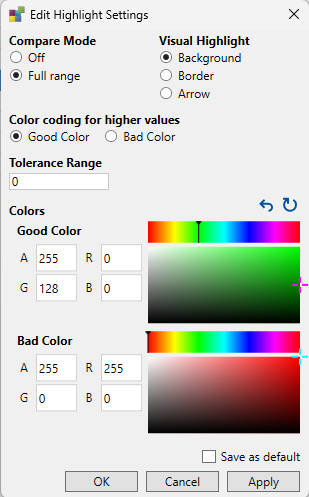
Compare Colors
|
Bad Color |
Color indicating an unfavorable comparison (value outside tolerance and worse). |
|
Good Color |
Color indicating a favorable comparison (value outside tolerance and better). |
|
Higher is better |
The meaning of "good" and "bad" can be inverted. |
|
Highlight Mode |
Choose the visual representation: Arrow, Border, or Background color. |
|
Tolerance Range |
Defines the acceptable range for value comparisons. Differences within this range are not highlighted. |
A popup for editing highlight settings is available in the channel’s context menu inside the table.
Line
|
Line Color |
Color of dot in front of a channels name (if Show Colored Dot is enabled). |
Style
|
Precision |
Sets how many decimal places are displayed for numeric values. Default is 4. |
|
Replacement Selection |
A regular expression pattern that identifies text to replace in the displayed value. |
|
Replacement String |
The string that replaces the matched pattern. |
|
Representation |
Sets the display format for the value (Decimal, Hexadecimal, Binary, Octal, Boolean). See LINK TO CHANNEL REPRESENTATION for details. |
|
Show Unit |
Determines whether the unit is displayed alongside the value. |