AddDecor
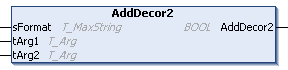
Adds formatted strings for decoration, with a variable number of arguments (0 to 5). This family of methods enables the incremental creation of formatted output strings with configurable delimiters, prefixes, and suffixes. The added values are combined using Finish().
Available versions
Method | Arguments | Description |
|---|---|---|
AddDecor | 0 | Adds a string without placeholders |
AddDecor1 | 1 | Adds a formatted string with 1 placeholder argument |
AddDecor2 | 2 | Adds a formatted string with 2 placeholder arguments |
AddDecor3 | 3 | Adds a formatted string with 3 placeholder arguments |
AddDecor4 | 4 | Adds a formatted string with 4 placeholder arguments |
AddDecor5 | 5 | Adds a formatted string with 5 placeholder arguments |
Syntax (Example: AddDecor2)
METHOD AddDecor2 : BOOL
VAR_INPUT
sFormat : T_MaxString;
tArg1 : T_Arg;
tArg2 : T_Arg;
END_VAR Inputs
Name | Type | Description |
|---|---|---|
sFormat (with arguments only) | The formatting string with placeholders (e.g., ’%d’ for integers, ’%s’ for strings). | |
sValue (AddDecor only) | The string to be added, without formatting. | |
tArg1 through tArgN | The arguments for the corresponding placeholders (number varies depending on the method). |
Sample
VAR
  fbDecor : FB_BA_DecorString;
END_VAR
Reset if a previous output is still present:
fbDecor.Reset();Add decorations:
fbDecor.AddDecor(Result: ');
fbDecor.AddDecor2('Temperature %d°C, Humidity %d%%', F_INT(25), F_INT(65));
fbDecor.AddDecor1('Sensor: %s', F_STRING('Room1'));
Conclude:
fbDecor.Finish();fbDecor.sOutput = "(Result: , Temperature 25°C, Humidity 65%, Sensor: Room1)"