FormatText
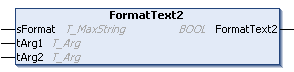
Formats and sets the message text using a variable number of arguments (1 to 5). This family of methods stores the formatted result in the sText property. The formatted text will later be combined with the decorations using Finish().
Available versions
|
Method |
Arguments |
Description |
|---|---|---|
|
FormatText1 |
1 |
Formatted with 1 placeholder argument |
|
FormatText2 |
2 |
Formatted with 2 placeholder arguments |
|
FormatText3 |
3 |
Formatted with 3 placeholder arguments |
|
FormatText4 |
4 |
Formatted with 4 placeholder arguments |
|
FormatText5 |
5 |
Formatted with 5 placeholder arguments |
Syntax (Example: FormatText3)
METHOD FormatText3 : BOOL
VAR_INPUT
  sFormat : T_MaxString;
  tArg1   : T_Arg;
  tArg2   : T_Arg;
  tArg3   : T_Arg;
END_VAR
 Inputs
|
Name |
Type |
Description |
|---|---|---|
|
sFormat |
The formatting string with placeholders (e.g., ’%d’ for integers, ’%s’ for strings). | |
|
tArg1 through tArgN |
The arguments for the corresponding placeholders (number varies depending on the method). |
Sample
VAR
  fbMsg : FB_BA_DecorMessage;
END_VAR
Format a message text with 2 arguments:
fbMsg.FormatText2('Temperature: %d°C, Humidity: %d%%', F_INT(25), F_INT(65));
Add decoration:
fbMsg.AddDecor1('Sensor: %s', F_STRING('Room1'));Conclude:
fbMsg.Finish();fbMsg.sOutput = "Temperature: 25°C, Humidity: 65% (Sensor: Room1)"