PersistentFile
Persistent data should be declared using the PERSISTENT keyword whenever possible.
There are use cases in which a static declaration is not sufficient (for example, arrays with a variable or unknown number of elements, large binary data sets, etc.).
In such cases, persistent data can be stored in file form on the controller. Various standard formats are available:
Formats
Each of the following formats defines a common layout for persistent data.
In this context, familiar means, for example, that the set-up of a *.csv file is well-known and that a corresponding file structure can be expected.
This, in turn, makes it possible to edit data using external applications (such as a text editor), which can be helpful.
Set-up
The PLC project includes (optionally) a Persistent Data Handler, which coordinates the writing of persistent data from individual providers.
Regardless of whether a write operation is triggered by a Persistent Data Handler or by any user-defined PLC code.
The amount of persistent data and the format in which it is stored are determined by the specific implementation in the provider.
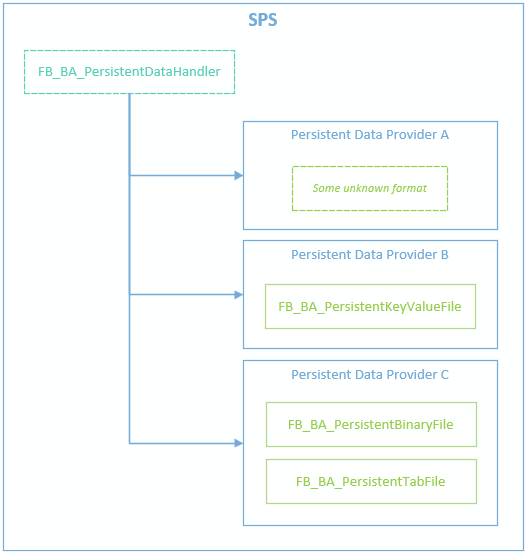
Several providers, each with different formats for persistent data.
Procedure
Writing data
The provider is prompted to write its persistent data.
It begins writing all persistent data. This section describes how to persist data using standard formats; however, writing can be implemented in any format. For example, the BACnet stack stores data in a custom *.wbp format.
Depending on the implemented format, the provider supplies different data for the write operation.
Once the process is complete, all the data will be stored in a file in the boot folder.
Read data
Persistent data can be read at any time. The timing is determined by the provider through the appropriate implementation.
Typically, persistent data is read when the PLC starts up.