MC_ReadNcIoInput
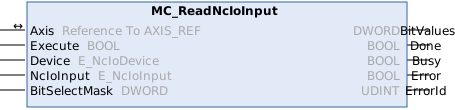
The MC_ReadNcIoInput function block can be used to read I/O inputs of the axis.
 Inputs
VAR_INPUT
    Execute           : BOOL;
    Device            : E_NcIoDevice := E_NcIoDevice.NcIoDeviceDrive;
    NcIoInput         : E_NcIoInput := E_NcIoInput.NcIoInputnState1;
    BitSelectMask     : DWORD := 16#0;
END_VAR
Name | Type | Description |
|---|---|---|
Execute | BOOL | The command is executed with a rising edge. |
Device | Selection of the Nc axis component whose I/O object is to be read (encoder or drive). | |
NcIoOutput | Choice of the sub-object whose value is to be read (e.g. nState1). | |
BitSelectMask | DWORD | Mask for selecting which bits are to be read. |
 Inputs/outputs
VAR_IN_OUT
    Axis : AXIS_REF;
END_VAR
Name | Type | Description |
|---|---|---|
Axis | Axis data structure that unambiguously addresses an axis in the system. Among other parameters it contains the current axis status, including position, velocity or error state. |
 Outputs
VAR_OUTPUT
    BitValues         : DWORD;
    Done              : BOOL;
    Busy              : BOOL;
    Error             : BOOL;
    ErrorID           : UDINT;
END_VAR
Name | Type | Description |
|---|---|---|
BitValues | DWORD | Values of the corresponding read bits. |
Done | BOOL | TRUE if the command was executed without errors. |
Busy | BOOL | TRUE as soon as the command is started with Execute and as long as the command is processed. If "Busy" is FALSE, the function block is ready for a new order. |
Error | BOOL | TRUE, if an error occurs. |
ErrorID | UDINT | If the error output is set, this parameter supplies the error number. |
Requirements
Development environment | Target platform | PLC library to include |
|---|---|---|
TwinCAT v3.1.4024.73 TwinCAT v3.1.4026 TF5000.NCPTP.XAE 1.0.6 TF5000.NCPTP.XAR 3.1.5038 | PC or CX (x86) | Tc2_MC2 v3.3.72 |