Tool orientation (TOOL ORI CS)
#TOOL ORI CS Selection of tool alignment (modal)The first motion block that follows #TOOL ORI CS aligns the tool in parallel to the 3 rd main axis of the current BKS (W0 or MKS are possible, too). Programming the rotary axes in this block overrides the positions that are valid for orientation.
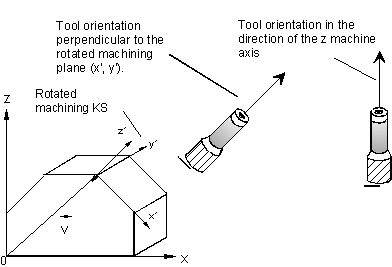 Fig.104: Aligning the tool perpendicularly to the machining plane (X-Y)
Programming example
N10 B10 C20 (Slanting the tool)
N20 #TOOL ORI CS (In next motion block, align tool in parallel to)
(the Z axis of the current BKS, here MKS)
N30 X0 Y0 (Motion block in the MKS, tool is aligned B=0,C=0)
N40 B25 C-80 (Slanting the tool)
N50 #TOOL ORI CS (Align tool in next motion block)
N60 #TRAFO ON (RTCP selection)
N70 #CS ON[0,0,0,-80,-30,45]
(Transition to a rotated BKS)
N80 X100 (Motion block in BKS. Tool alignm. from N50 refers)
(to the MKS, thus B=0,C=0)
N90 #TOOL ORI CS (Align tool in rotated BKS)
N100 Y150 (Tool is aligned in parallel to the Z axis of BKS)
N110 #TOOL ORI CS
N120 Z100 B45 C10 (#TOOL ORI CS is without effect in programming of)
(rotary axes)
N130 G18 (Change to the Z-X-interpolation plane)
N140 #TOOL ORI CS (Align tool in parallel to the Y axis)
N150 X0 (Tool aligned perpendicularly to the X-Z machining)
(plane)
M30