Category Deployment
The category Deployment is used to set up commands that are to be executed during the installation and startup of an application.
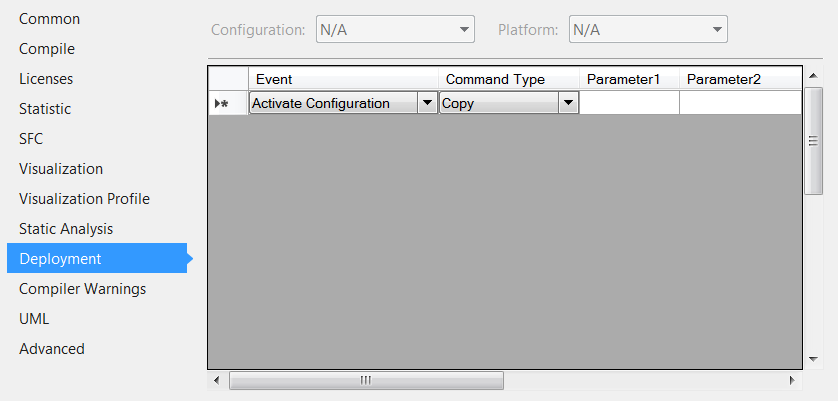
The following events are available, after which the commands listed in the list can be called:
Activate Configuration | The required command is called up after the configuration has been enabled. |
Plc Download | The required command is called up after the PLC application has been downloaded to the target system. |
Plc Online Change | The required command is called after a successful online change. |
Plc After Compile | The required command is called after a compilation of the PLC application. |
The following commands can be executed:
Copy | Copies files from parameter 1 (source path) to a location specified in parameter 2 (target path). |
Execute | Executes the application or script listed under parameter 1. |
Source and target paths can contain virtual environment variables, which TwinCAT resolves accordingly.
The following environment variables are supported:
Virtual environment variable | Registry value | Default value Windows (TC3.1 Build 4024) | Default value Windows (TC3.1 Build 4026) | Default value TwinCAT/BSD® | Default value for Beckhoff RT Linux® |
|---|---|---|---|---|---|
%TC_INSTALLPATH% | InstallDir | C:\TwinCAT\3.1\ | C:\Program Files (x86)\Beckhoff\TwinCAT\3.1\ | /usr/local/etc/TwinCAT/3.1/ | /etc/TwinCAT/3.1/ |
%TC_CONFIGPATH% | ConfigDir | C:\TwinCAT\3.1\Config\ | C:\Program Files (x86)\Beckhoff\TwinCAT\3.1\Config\ | /usr/local/etc/TwinCAT/3.1/Config/ | /etc/TwinCAT/3.1/Config/ |
%TC_TARGETPATH% | TargetDir | C:\TwinCAT\3.1\Target\ | Kernel Mode Runtime: C:\Program Files (x86)\Beckhoff\TwinCAT\3.1\Target User mode runtime: C:\ProgramData\Beckhoff\TwinCAT\3.1\Runtimes\UmRT_Default\3.1\Target | /usr/local/etc/TwinCAT/3.1/Target/ | /etc/TwinCAT/3.1/Target/ |
%TC_SYSTEMPATH% | SystemDir | C:\TwinCAT\3.1\System\ |
| /usr/local/etc/TwinCAT/3.1/System/ | /etc/TwinCAT/3.1/System/ |
%TC_BOOTPRJPATH% | BootDir | C:\TwinCAT\3.1\Boot\ | Kernel Mode Runtime: C:\ProgramData\Beckhoff\TwinCAT\3.1\Boot\ User mode runtime: C:\ProgramData\Beckhoff\TwinCAT\3.1\Runtimes\UmRT_Default\3.1\Boot | /usr/local/etc/TwinCAT/3.1/Boot | /etc/TwinCAT/3.1/Boot |
%TC_RESOURCEPATH% | ResourceDir | C:\TwinCAT\3.1\Target\Resource\ |
| /usr/local/etc/TwinCAT/3.1/Target/Resource/ | /etc/TwinCAT/3.1/Target/Resource/ |
%TC_REPOSITORYPATH% | RepositoryDir | C:\TwinCAT\3.1\Repository\ | C:\ProgramData\Beckhoff\TwinCAT\3.1\Repository\ | /usr/local/etc/TwinCAT/3.1/Repository | /etc/TwinCAT/3.1/Repository |
%TC_DRIVERPATH% | DriverDir | C:\TwinCAT\3.1\Driver\ |
| not available |
|
%TC_DRIVERAUTOINSTALLPATH% | DriverAutoInstallDir | C:\TwinCAT\3.1\Driver\AutoInstall\ |
| /usr/local/etc/TwinCAT/3.1/ | /etc/TwinCAT/3.1/ |
%TC_DRIVERAUTOLOADPATH% | DriverAutoLoadDir |
|
|
|
|
%TC_LICENSEPATH% | LicenseDir | C:\TwinCAT\3.1\License\ | C:\ProgramData\Beckhoff\TwinCAT\3.1\License\ |
|
|
%TC_USERPATH% |
|
|
|
|
|
%TC_DATAPATH% | DataDir | C:\TwinCAT\3.1\ | C:\ProgramData\Beckhoff\TwinCAT\3.1\ |
|
|
%SOLUTIONPATH% | - | Location of the solution file |
|
|
|
The registry values are stored under the following key in the registry: \HKLM\Software\WOW6432Node\Beckhoff\TwinCAT3\3.1.
Example:
In the following example, the file SampleFile.xml is copied from the Config project subfolder of the solution to the folder C:\plc\config on the target system.
